

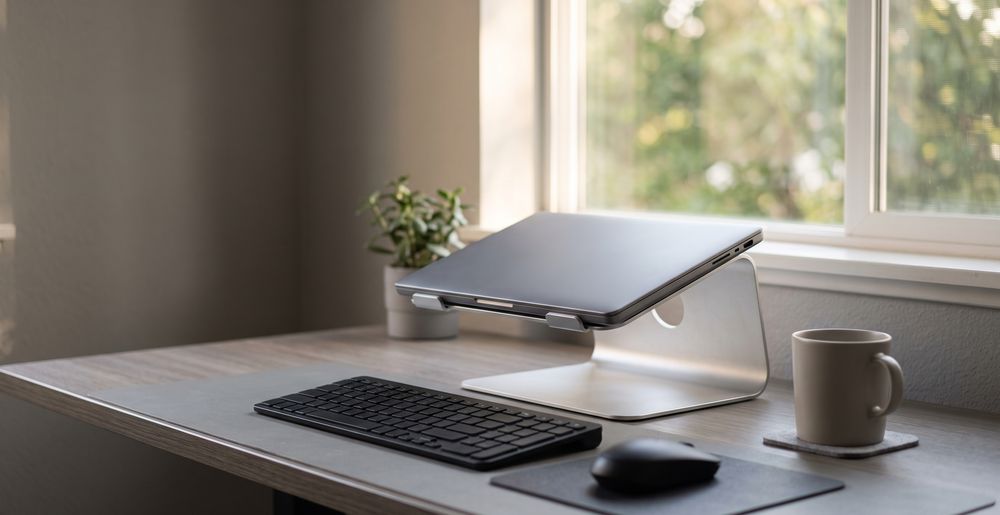
Best Laptop Stand for Ergonomic Home Working

About the author...
Dave has been taking gadgets apart since he was old enough to be told not to. Every pick here is checked against the manufacturer's own documentation rather than the retail listing, and each star rating starts from a product's real Amazon customer score before being adjusted for performance, build quality, features and value. Read more about how ratings are calculated.
Table of contents
- Key Takeaways (TL;DR)
- How We Choose
- Quick Comparison
- BoYata Laptop Stand, Height Adjustable Laptop Riser for 11-17 Inch Laptops
- Rain Design mStand Laptop Stand
- Nulaxy Full Aluminum Laptop Stand, Stable Support to 22 lbs
- Roost V3 Laptop Stand
- SOUNDANCE 360 Rotating Laptop Stand, Adjustable Riser
- Urmust Adjustable Laptop Stand for Desk
- UGREEN Vertical Laptop Stand for Desk
- havit HV-F2056 Laptop Cooling Pad
- VIVO 91cm K Series Desk Converter
- Best Laptop Stand FAQ
- The Best Laptop Stand for You
The best laptop stand for most home workers is the BoYata Height Adjustable Laptop Stand, thanks to a genuine height-adjustment range that brings a wide span of laptops closer to real eye level and a dual-plate aluminum build that holds up to daily use. See the comparison below for how eight other well-reviewed alternatives stack up depending on your priorities.
A laptop stand does one simple job: it lifts your screen so the top of the display sits nearer to eye level, instead of leaving you hunched forward over a screen sitting flat on the desk. Anyone spending more than an hour or two a day on a laptop benefits from that lift, whether they work from a dedicated desk, a kitchen table, or a rotation of coworking spaces. The catch is that not every "adjustable" stand adjusts far enough for every user, and not every fixed stand suits every desk and chair combination.
A good stand is built from solid aluminum or a similarly rigid metal. It holds its position under the actual weight of your laptop without drifting, and either folds small enough to travel comfortably or sits stable enough that you never need to move it. A weaker one wobbles when you type on it directly, claims a height range it doesn't really deliver, or turns out to be rated for a laptop lighter than the one you actually own.
Key Takeaways (TL;DR)
- Height range matters more than the "fits up to X inches" number on the box; check the actual screen-lift range against your desk and chair.
- Aluminum construction dissipates heat and resists flex far better than plastic, especially at hinge points under daily stress.
- Weight capacity claims range from under 9 lb to over 20 lb on the stands here, so check yours against your laptop's real weight.
- Ventilated, open-back designs genuinely improve airflow over a flat desk, but won't rescue a laptop with clogged or failing fans.
- Folded size and weight only matter if you actually move the stand; a fixed riser is often the sturdier choice if it lives on one desk.
- A stand alone won't fix your posture. Raising the screen also raises the built-in keyboard, so a separate keyboard and mouse are part of the real setup.
- Typical lifespan runs several years for solid metal stands; folding hinges are usually the first part to show wear.
How We Choose
We compared each stand's real height and angle adjustment range against genuine ergonomic guidance rather than marketing copy. Weight capacity, material, and laptop-size compatibility were cross-checked against each manufacturer's own listing, instead of repeating whichever number read best in the title. We also weighed portability and folded size for anyone splitting time between a home desk and an office, and looked at ventilation design and review patterns for signs of recurring wobble, hinge wear, or overheating.
We don't run our own lab tests on these — no dedicated rig, no controlled conditions. What we do instead: read through the verified-purchase reviews in full, not just the star average, weighting the ones written weeks or months after purchase over launch-week first impressions, since that's where wear, reliability problems, and real-world performance gaps actually show up. Where a product genuinely lacks that kind of track record, we say so in its write-up rather than papering over it.
Quick Comparison
Each product's overall rating starts from its real Amazon customer rating, then gets adjusted (up to ±0.5) for real-world performance, build quality, features, and value. Click a product name to jump straight to its full review below.
| Product | Best For | Type | Key Detail | Height Range |
|---|---|---|---|---|
|
BoYata Laptop Stand, Height Adjustable Laptop Riser for 11-17 Inch Laptops 5.0 |
Most home workers wanting genuine height adjustment | Height-adjustable stand | 10-17in, height adjustable | Dual metal base plates, 5kg rated capacity |
|
Rain Design mStand Laptop Stand 4.7 |
Desk-bound laptop owners wanting a minimalist build | Fixed aluminum riser | 5.9in fixed height | Single-piece anodized aluminum, 2.5mm thick |
|
Nulaxy Full Aluminum Laptop Stand, Stable Support to 22 lbs 4.9 |
Heavier 15-16 inch laptops that need extra cooling | Detachable fixed riser | 22 lb (10 kg) rated capacity | 5mm CNC aluminum, 10kg rated capacity |
|
Roost V3 Laptop Stand 4.9 |
Commuters who need eye-level height on the move | Folding travel stand | 6.5-12.5in screen lift | Folds to 13in, 178g |
|
SOUNDANCE 360 Rotating Laptop Stand, Adjustable Riser 4.8 |
Turning your screen toward someone during a call | Rotating adjustable stand | 360-degree rotating base | 360-degree swivel base, vented design |
|
Urmust Adjustable Laptop Stand for Desk 4.7 |
Budget buyers who still want angle control | Foldable adjustable stand | 0-90 degree continuous tilt | Continuous 0-90 degree tilt, aluminum |
|
UGREEN Vertical Laptop Stand for Desk 4.9 |
Docked setups where the laptop stays closed | Vertical dock stand | Fits 0.47-1in laptops, vertical | Solid aluminum alloy, non-slip base |
|
havit HV-F2056 Laptop Cooling Pad 4.6 |
Gaming and creator laptops that run hot | Cooling pad / stand | 3 active cooling fans | 3 fans, 2 USB ports |
|
VIVO 91cm K Series Desk Converter 5.0 |
Converting an existing desk to sit-stand | Sit-stand desk converter | 4.5-20in height range, 33lb capacity | Steel frame, 3-year warranty |
BoYata Laptop Stand, Height Adjustable Laptop Riser for 11-17 Inch Laptops
Best Laptop Stand Overall
based on 8369 Amazon reviews (4.7★), adjusted for performance, build and value
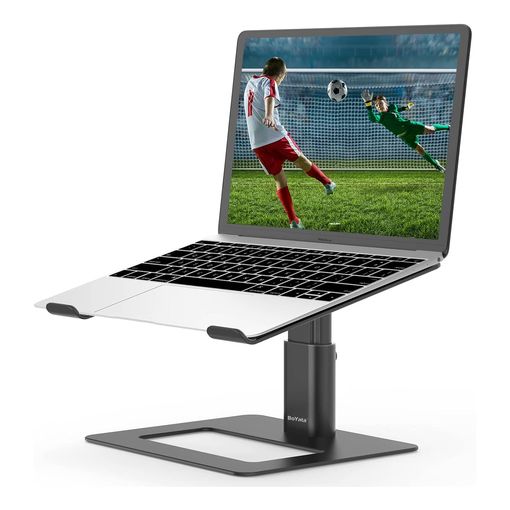
What We Love About the Overall Pick
BoYata earns the top spot because it's genuinely adjustable rather than just claiming to be. A support rod at the back lifts the screen roughly 4 to 7.4 inches above the desk on top of the laptop's own height, adjusted by twisting a knob rather than fiddling with a lever. That range is combined with compatibility across 10 to 17-inch laptops and a review history running past 8,300 ratings at 4.7 stars. Together, that makes it the safest all-round choice for someone setting up a single desk they'll use every day. One honest gap: none of its reviews report back after any real stretch of ownership, so the praise on record is mostly first-impression build quality rather than a proven multi-year track record.
The Overall Pick: All The Details
The stand uses two 3mm metal base plates joined by a support rod, rated to hold laptops up to 5kg (about 11 lb). Large rubber pads sit on both the top and bottom surfaces, and hooked edges on the laptop tray stop it sliding forward during use. The bracket's open, U-shaped structure leaves more room for air to move underneath the laptop than resting it flat on a desk would. BoYata advertises round-the-clock online support for buyers, though the brand runs its retail presence primarily through Amazon rather than a dedicated consumer site. One honest limit: its added lift, while real, is more modest than the specialised portability pick further down this list. A very tall user on a low desk may still want to pair it with a slightly raised chair.
Rain Design mStand Laptop Stand
Best Premium Laptop Stand
based on 3756 Amazon reviews (4.7★), adjusted for performance, build and value
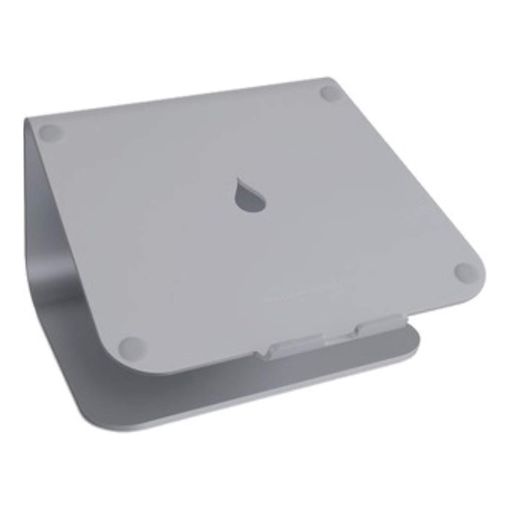
What We Love About the Premium Pick
The mStand is machined from a single piece of anodized aluminum rather than assembled from folded sheet metal or a hinge-and-joint frame, and it shows. There's nothing to loosen over time because there's almost nothing that moves. Rain Design has been making Mac accessories for years, and the finish and heft here reflect that history rather than a rebadged generic design. It also acts as a passive heat sink, drawing warmth away from the base of the laptop while it sits. That single-piece build backs up its own claim in practice, too: one owner said they'd "had one of there for several years" and bought a second for their partner, since unlike assembled rivals it "will never fall apart or need to be tightened up."
The Premium Pick: All The Details
Rain Design's own spec page lists the mStand at a fixed 5.9 inches (150mm) tall, 10 inches wide, and 7.5 inches deep, weighing 3 lb (1.46kg)1. It's built for MacBooks and MacBook Pros specifically, though its open cradle shape fits most similarly sized ultrabooks too. There's no published weight capacity and no separate warranty terms listed on the product page. The obvious tradeoff is that fixed height. There's no angle adjustment and no way to raise or lower it once it's on your desk, so it either matches your setup or it doesn't. At nearly 1.5kg, it's not something you'll casually move between rooms either.
Nulaxy Full Aluminum Laptop Stand, Stable Support to 22 lbs
Best Laptop Stand for Large, Heavy Laptops
based on 11960 Amazon reviews (4.7★), adjusted for performance, build and value
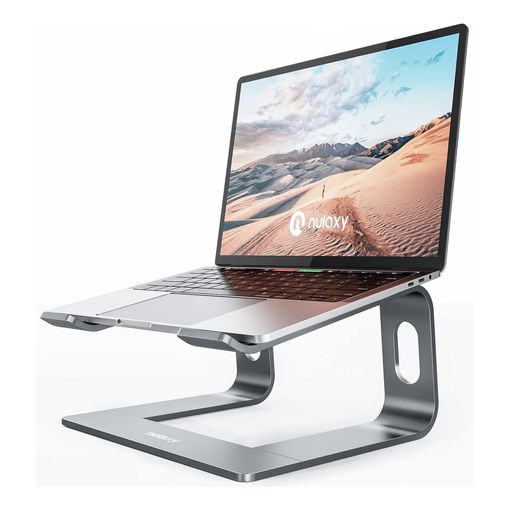
Where the Large-Laptop Pick Pulls Ahead
This is the stand to reach for if you're running a heavier 15 or 16-inch gaming or creator laptop that other stands' weight ratings don't comfortably cover. Nulaxy rates it to hold up to 22 lb (10kg), roughly double the capacity of the budget pick in this lineup. It's built from 5mm CNC-cut aluminum alloy rather than the thinner sheet metal common at this price, and over 11,900 reviews back it up at 4.7 stars, the highest review count of any product here. One gap worth naming: none of its reviews describe using it for more than a few weeks, so there's genuine praise for the initial build quality but no verified multi-year track record yet.
The Large-Laptop Pick: All The Details
The stand elevates the screen to a fixed 7 inches, detaches into three parts for flatter storage, and uses an open-back design that leaves space for airflow underneath the laptop. There's no angle adjustment and no height range to speak of; it's a single-height riser rather than a fully adjustable one. Worth flagging: Nulaxy's own compatibility bullet on the listing states laptops between 10 and 16 inches, even though the same listing's title advertises "10-17 inch" compatibility. Check your laptop's actual footprint against Nulaxy's published dimensions rather than trusting the headline figure. The listing also recommends pairing it with an external keyboard and mouse, noting that Nulaxy's own testing found typing directly on the raised laptop introduces a slight wobble.
Roost V3 Laptop Stand
Best Laptop Stand for Portability
based on 1666 Amazon reviews (4.7★), adjusted for performance, build and value
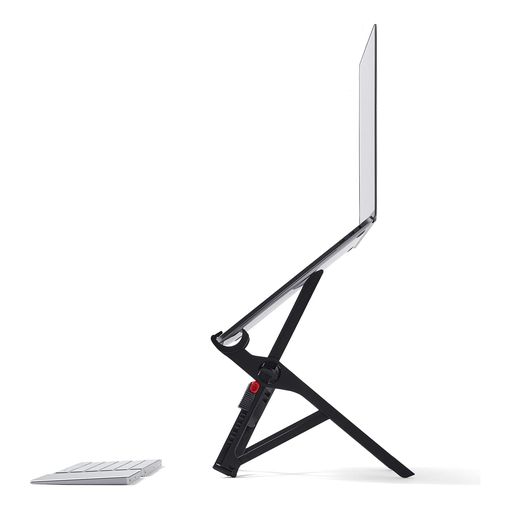
The Case for the Portability Pick
If you carry a laptop stand between a home office and a shared desk, or you travel regularly, none of the other five products here fold as small as this one. Roost's own listing puts the folded size at roughly 1 x 1.5 x 13 inches, weighing just 178g (6oz). That's light and thin enough to slide into a laptop bag's side pocket without noticing it's there. Height adjustment runs from 6.5 to 12.5 inches of screen lift, set with a two-handed lock that snaps open to a memorized position. That's especially useful if you set up and break down a desk every day. One buyer who folded it out daily for work reported back after roughly 2.5 months of that routine that it was "really sturdy" and still held his 14-inch ThinkPad and 13-inch MacBook Pro firmly in place.
The Portability Pick: All The Details
Roost markets the design around resisting the screen shake that cheaper folding stands are prone to, and it's backed by a 90-day money-back guarantee direct from the manufacturer2. What the listing doesn't publish is a weight capacity figure or a specific material breakdown. The light weight, 178g for the whole stand, suggests an engineered composite rather than solid aluminum in at least some of the frame. It also sits at the premium end of the market for what amounts to a folding bracket. Buyers paying mainly for portability are trading some of the raw sturdiness of a solid metal riser for a stand that actually fits in a bag.
SOUNDANCE 360 Rotating Laptop Stand, Adjustable Riser
Best Laptop Stand with a Rotating Base
based on 2462 Amazon reviews (4.7★), adjusted for performance, build and value
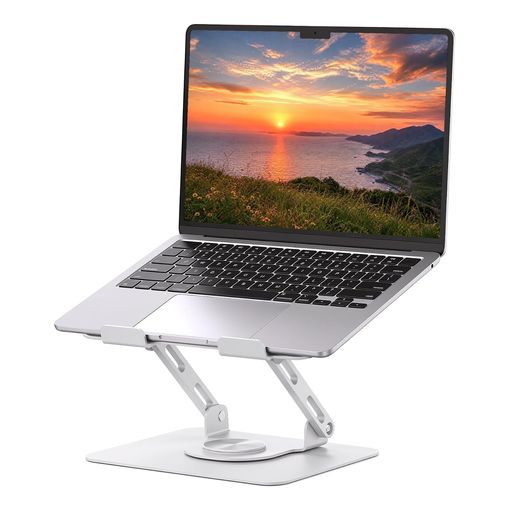
The Draw of the Rotating-Base Pick
This is the only stand in the roundup with a full 360-degree swivel base. That sounds like a gimmick until you're on a video call and need to turn the screen toward someone standing beside you, or share your laptop across a desk without lifting the whole rig. Height and angle both adjust independently of the rotation. The base is noticeably heavier than the aluminum arms on rivals here, added specifically to keep the whole thing from tipping or wobbling when you spin it. One honest gap: none of its reviews describe using the stand for more than a few weeks, so the swivel mechanism's long-term wear hasn't been genuinely tested by the reviews on record yet.
The Rotating-Base Pick: All The Details
Soundance builds the base from what its listing describes as a heavier metal than the lightweight aluminum alloy used on typical risers. Upgraded joint screws are meant to reduce play at the adjustment points. The hollow, ventilated design leaves clear space beneath the laptop for heat to escape. It's compatible with laptops from 10 to 17 inches. What's missing is a published weight capacity, so heavier laptop owners are relying on general build quality rather than a stated number. With roughly 2,460 reviews behind it, it also has a shorter track record than the higher-volume picks in this list, though its 4.7-star average holds steady.
Urmust Adjustable Laptop Stand for Desk
Best Budget Laptop Stand
based on 17567 Amazon reviews (4.6★), adjusted for performance, build and value
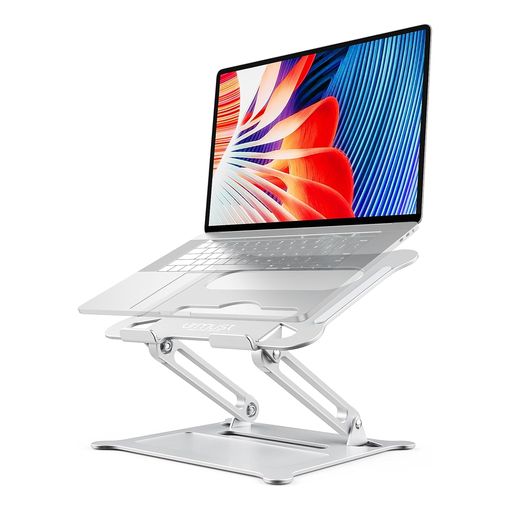
Why the Budget Pick Still Delivers
Urmust doesn't cut the one feature that actually matters for posture: it still tilts continuously from 0 to 90 degrees, so you're not locked into a handful of preset angles the way some budget stands force you to be. With more than 17,500 ratings at 4.6 stars, it's also the single most-reviewed product in this entire roundup, at the most accessible price point of the six. Worth flagging honestly: despite that huge review count, none of its visible reviews report back after a real stretch of ownership, so treat the rating as a snapshot of first impressions rather than a proven long-term track record.
The Budget Pick: All The Details
The frame is aluminum with airflow perforations cut into the surface, sitting on four anti-skid silicone pads with hooked arms at the front to stop a laptop sliding forward mid-use. It folds flat for storage between sessions. The compromise shows up in two places. Urmust rates the stand to hold only 8.8 lb (4kg), noticeably less than the 11 lb and 22 lb ratings on the overall and large-laptop picks above. Its published compatibility also tops out at 15.6 inches, rather than stretching to the 16 and 17-inch laptops several rivals here accommodate. For a smaller ultrabook or a 13-inch MacBook, that ceiling won't matter. For a 16-inch machine, it will.
UGREEN Vertical Laptop Stand for Desk
Best Vertical Laptop Stand
based on 11685 Amazon reviews (4.6★), adjusted for performance, build and value
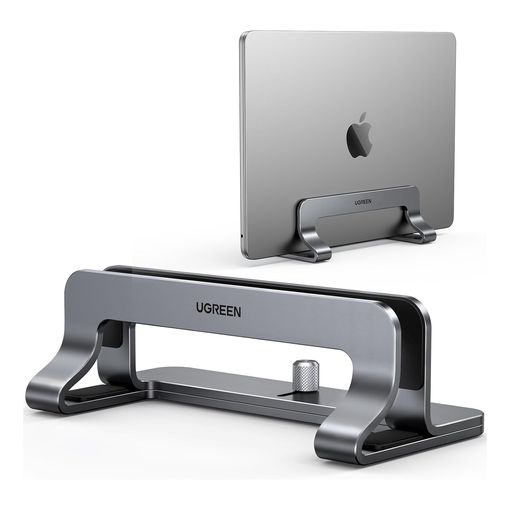
What We Love About Going Vertical
Every other stand in this roundup assumes the laptop stays open, but plenty of desks run a closed laptop docked to an external monitor and keyboard, and none of the horizontal risers above solve that. The UGREEN slots a laptop in on its edge instead, freeing an entire footprint of desk space that a flat riser can't. The width adjusts from 0.47 to 1 inch to grip laptops from a slim MacBook Air up to thicker gaming machines, and rubberized grips inside the slot stop scratches. With over 11,600 reviews at 4.6 stars, it's the single most-reviewed product in this entire lineup. None of the verified-purchase reviews we found describe using it for more than the first few weeks, so while the aluminum build reads as solid out of the box, there's no long-term wear signal here yet.
The Vertical Pick: All The Details
The stand is machined from solid aluminum alloy rather than the folded sheet metal common on horizontal risers, and that extra weight is the point: it keeps a top-heavy closed laptop from tipping. A silicone-padded base grips the desk, and the slot itself is lined to prevent scuffing. It only works for the closed-lid, external-display workflow. If you actually look at the laptop's own screen while working, this isn't the pick, since the whole point is hiding the laptop out of your eyeline while an external monitor does the work.
havit HV-F2056 Laptop Cooling Pad
Best Active-Cooling Stand
based on 39957 Amazon reviews (4.4★), adjusted for performance, build and value
What We Love About Active Cooling
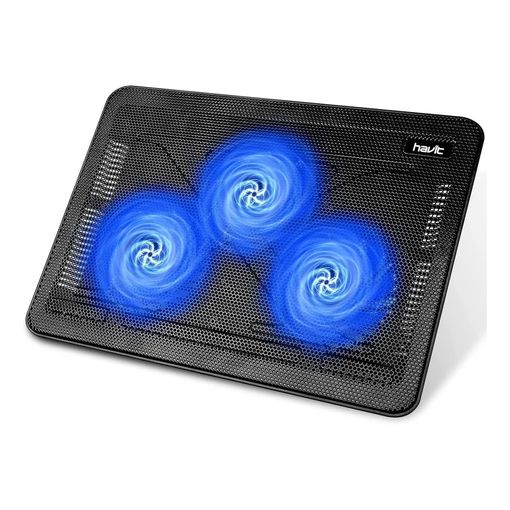
None of the other stands in this post move air; they just get the laptop off the desk and hope the gap underneath is enough. For a lightly loaded ultrabook that's usually fine, but a gaming or creator laptop pushing its fans hard needs more than passive ventilation. The havit adds three fans under a metal mesh deck, with two height settings and a spare USB port for a mouse. Nearly 40,000 reviews back it at 4.4 stars, the largest review base of any product in this roundup by a wide margin. One reviewer's account is about as honest a long-term signal as this category gets: bought in March 2021 and still in near-daily use in January 2025, they reported it ran "amazing" at first and cooled the laptop "considerably," but "for well over a year now it has been very loud, often requiring a dense shake to quieten it up" despite repeated cleaning.
The Active-Cooling Pick: All The Details
The deck is a metal mesh surface rather than solid plastic, letting the three fans actually pull air through rather than just blow it at a sealed underside. Power comes from a USB cable rather than a battery, so it only works plugged into the laptop or a wall adapter, and there's no folding or portability angle here; it's built to live on one desk. The nearly-four-year review above points at the honest limitation of a budget cooling fan: the fans themselves are the part most likely to wear out, and when they do, the pad still functions as a passive riser but loses the reason you bought it.
VIVO 91cm K Series Desk Converter
Best Standing Desk Converter
based on 12332 Amazon reviews (4.6★), adjusted for performance, build and value
What We Love About Going All the Way to Standing
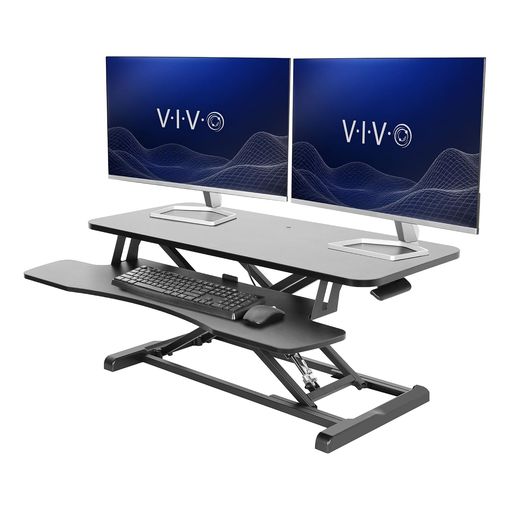
Every stand above raises a laptop a few inches; this one takes the idea to its logical end and lifts the whole workstation to standing height. A pneumatic lift takes the 91.4 x 39.9cm top surface from 11.4cm up to 50.8cm above the desk in one motion, rated for a patented 10,000 lift cycles, and a synced keyboard tray rises with it so typing height doesn't get thrown off.3 It's rated to hold 15kg (33lb), enough for a laptop plus one or two external monitors.3 Over 12,300 reviews sit at 4.6 stars, and VIVO backs the steel frame with a 3-year warranty, longer than any other product in this lineup.3 None of the verified-purchase reviews we found describe using it for more than a few months, so while the frame and lift mechanism read as sturdy now, we can't yet confirm how it holds up over years.
The Standing-Desk Pick: All The Details
This is a genuinely different category of product from the rest of this post: a full desk converter rather than a simple riser, and both its footprint and its price reflect that. Assembly is minimal, mostly attaching the keyboard tray, and the lift mechanism needs no batteries or power. The tradeoff is scale. It needs enough desk depth to sit on top of an existing surface, and it's the heaviest, priciest item in this lineup by a clear margin. Buy this one only if the actual goal is alternating between sitting and standing through the day, not simply lifting a laptop screen a few inches closer to eye level.
Best Laptop Stand FAQ
What's the single most important spec when choosing a laptop stand? Height and angle adjustment range matters more than the "fits laptops up to X inches" line most listings lead with. A stand's job is to bring the top of your screen closer to eye level. Occupational health guidance from bodies including the UK's Health and Safety Executive and the US Occupational Safety and Health Administration both describe the top of the screen sitting at or near eye level as the target for a comfortable setup45. A stand with a short lift range might not get a tall user there, even if it technically fits their laptop.
Will a laptop stand alone fix my posture and neck pain? No, and it's worth being clear about that before you buy one. Raising the screen with a stand also raises the laptop's built-in keyboard and trackpad out of a comfortable typing position. That's exactly why the HSE's own guidance on laptop use recommends a separate keyboard and mouse alongside a riser, rather than leaving the stand to do the whole job on its own4. Budget for those two extra items if you don't already have them.
How high should my screen actually sit? General ergonomic guidance points to the top of the screen sitting roughly level with your eyes, at around arm's length away, rather than well above or below eye line45. Exact comfortable height still depends on your chair, desk, and own height, so treat that as a starting point to adjust from rather than an exact number to hit.
Does "fits laptops up to 17 inches" always mean it'll fit mine? Not reliably. As with the Nulaxy pick in this roundup, a listing's title and its own detailed compatibility bullet can disagree by a full inch or more. Weight capacity figures also come from the manufacturer rather than independent testing. Check the stated dimensions and rated capacity against your laptop's actual size and weight, not just the headline number in the product title.
Does a laptop stand actually stop a laptop overheating? An open, ventilated design gives air more room to move under the laptop than resting it flat on a desk does, and that helps somewhat. A passive riser won't rescue a laptop whose internal fans are already clogged with dust or failing; an active cooling pad like the havit pick above, which adds its own fans, does more for a gaming or creator laptop that's genuinely thermal-throttling. Either way, a stand isn't a substitute for occasionally cleaning out your laptop's vents if it's running hot regardless of what it's sitting on.
Should I get a fixed-height stand or an adjustable one? A fixed stand like the mStand is simpler, has fewer moving parts to wear out, and tends to feel sturdier for the price. It only works if its fixed height happens to suit your desk and chair. An adjustable stand costs you a small amount of long-term reliability at the hinge or locking mechanism. In exchange, it lets you dial in the right height for your own setup, and adjust it again later if you change desks or chairs.
How long do laptop stands typically last? Solid aluminum stands with few or no moving parts tend to outlast the laptops you'll use on them, often running for years without any real degradation. Folding and hinged designs are more exposed. The locking mechanism or hinge is usually the first part to develop play or wobble, well before the metal or composite frame itself gives out.
What else do I need for a genuinely ergonomic laptop setup? Beyond the stand itself, a separate wired or wireless keyboard and mouse are close to essential once the built-in ones are raised out of reach. That's the same point the HSE's laptop guidance makes4. Many people also add a footrest or an adjustable chair. If you use the laptop alongside an external monitor, a monitor arm lets you match the two screens to a similar height.
The Best Laptop Stand for You
The BoYata Height Adjustable Laptop Stand is the pick for most people setting up a single home desk, thanks to real adjustability and a wide compatible size range. Choose the Rain Design mStand if you want the sturdiest possible build and your desk height already suits a fixed 5.9-inch lift. Pick the Nulaxy if you're running a heavy 15 or 16-inch machine, or the Roost V3 if the stand needs to travel with you. If your laptop stays closed and docked to an external monitor, the UGREEN vertical stand frees up real desk space that none of the horizontal risers can match, and if the real goal is alternating between sitting and standing all day rather than just lifting a screen a few inches, the VIVO desk converter is a genuinely different category of product worth the extra cost. Whichever you choose, remember that the stand is only half the setup: pair it with a separate keyboard and mouse if you're using it for more than the occasional quick task.