

Best Mechanical Keyboard for Gaming and Everyday Typing

About the author...
Dave has been taking gadgets apart since he was old enough to be told not to. Every pick here is checked against the manufacturer's own documentation rather than the retail listing, and each star rating starts from a product's real Amazon customer score before being adjusted for performance, build quality, features and value. Read more about how ratings are calculated.
Table of contents
- Key Takeaways (TL;DR)
- How We Choose
- Quick Comparison
- SteelSeries Apex Pro TKL Gen 3
- Keychron K10 Pro QMK/VIA Wireless Mechanical Keyboard
- RK ROYAL KLUDGE RK84 Wireless Hot-Swappable Mechanical Keyboard
- Logitech MX Mechanical Mini Wireless Illuminated Keyboard
- Razer Huntsman V2 TKL Tenkeyless Gaming Keyboard
- Corsair K65 RGB Mini 60% Mechanical Gaming Keyboard
- Kinesis Freestyle Pro QUIET Ergonomic Split Mechanical Keyboard
- Redragon K552 Kumara Mechanical Gaming Keyboard
- nuphy Air75 V3 Aluminum Wireless Mechanical Keyboard
- EPOMAKER Ajazz AK820 Pro 75% Mechanical Keyboard
- CORSAIR K70 CORE RGB Mechanical Wired Gaming Keyboard
- Best Mechanical Keyboard FAQ
- The Best Mechanical Keyboard for You
The best mechanical keyboard overall is the SteelSeries Apex Pro TKL Gen 3. It wins on adjustable magnetic actuation and a genuinely useful Rapid Trigger feature for competitive play. It won't suit everyone, though. See the comparison below for ten other well-reviewed picks, whether you're gaming, typing all day, switching between a Mac and a Windows machine, or dealing with wrist strain that a standard board makes worse.
A mechanical keyboard swaps the rubber dome under a standard keyboard for a spring-loaded switch under each key. That changes how a keystroke feels. On models with hot-swap sockets, you can even change that feel later without buying a whole new board. Gamers mostly care about speed: how fast and consistently a switch registers a press. Writers and coders tend to care more about sound and feel over an eight-hour shift. Both crowds shop in the same category, which is why this list covers both.
Three things separate a good mechanical keyboard from a mediocre one. First is the switch itself: how hard you press, how far it travels, and whether it's linear, tactile, or clicky. Second is the frame and keycap material. Thin plastic keycaps go shiny and wear out faster than thicker PBT ones. Third, increasingly, is whether the switches can be swapped out, so a bad stock switch isn't a dealbreaker. None of the six keyboards below get everything right. We say plainly where each one falls short.
Key Takeaways (TL;DR)
- Switch type matters more than brand. Linear, tactile, and clicky switches feel and sound completely different; try before committing to one blind.
- Hot-swap sockets let you replace stock switches without soldering, which matters most on budget boards with mediocre factory switches.
- Adjustable actuation (Hall Effect or optical switches with tunable trigger points) is the genuine gaming upgrade over a fixed-actuation switch, not RGB lighting.
- PBT keycaps resist shine and wear better than ABS over years of daily use; ABS keycaps go glossy on the most-used keys within a year or two.
- A 60% or 75% layout saves real desk space but pushes arrow keys and function keys onto a secondary Fn layer, which takes adjustment.
- Expect to spend on top of the keyboard itself: a wrist rest, and possibly a second set of keycaps or switches if you want to fine-tune the stock feel.
- Wireless boards add real weight in battery life claims, but a wired connection still edges out Bluetooth for the very lowest input latency.
How We Choose
We weigh how each keyboard's switches actually perform, not just what the marketing copy says. Speed and switch claims get checked against the maker's own listing, not Amazon's bullet points. Build quality looks at frame material, keycap quality, and whether switches can be swapped out. Features covers what's genuinely useful day to day, not what pads a spec sheet. Value is judged against the other ten keyboards in this list, not the wider market.
We don't run our own lab tests on these — no dedicated rig, no controlled conditions. What we do instead: read through the verified-purchase reviews in full, not just the star average, weighting the ones written weeks or months after purchase over launch-week first impressions, since that's where wear, reliability problems, and real-world performance gaps actually show up. Where a product genuinely lacks that kind of track record, we say so in its write-up rather than papering over it.
Quick Comparison
Each product's overall rating starts from its real Amazon customer rating, then gets adjusted (up to ±0.5) for real-world performance, build quality, features, and value. Click a product name to jump straight to its full review below.
| Product | Best For | Type | Key Detail | Key Spec |
|---|---|---|---|---|
|
SteelSeries Apex Pro TKL Gen 3 4.9 |
Competitive gamers who want a tunable switch feel | Tenkeyless gaming keyboard | 0.1-4.0mm adjustable actuation | OmniPoint 3.0 Hall Effect switches, Rapid Trigger |
|
Keychron K10 Pro QMK/VIA Wireless Mechanical Keyboard 4.6 |
Anyone switching a single keyboard between Mac and Windows | Full-size wireless keyboard | 108 keys, hot-swappable | QMK/VIA programmable, hot-swap K Pro switches |
|
RK ROYAL KLUDGE RK84 Wireless Hot-Swappable Mechanical Keyboard 4.6 |
Budget buyers who still want hot-swap sockets | 75% wireless keyboard | Tri-mode BT5.0/2.4GHz/USB-C | Hot-swap PCB, 3750mAh battery |
|
Logitech MX Mechanical Mini Wireless Illuminated Keyboard 4.6 |
Quiet typing across several devices in an office | Compact wireless keyboard | Up to 15-day battery life | Tactile Quiet switches, 3-device Bluetooth switching |
|
Razer Huntsman V2 TKL Tenkeyless Gaming Keyboard 4.8 |
Fast-paced games where every millisecond of input lag counts | Tenkeyless gaming keyboard | 8000Hz true polling rate | Gen-2 linear optical switches |
|
Corsair K65 RGB Mini 60% Mechanical Gaming Keyboard 4.9 |
A minimal desk footprint without giving up gaming speed | 60% compact keyboard | 60% layout, 8000Hz hyper-polling | AXON hyper-polling, genuine Cherry MX switches |
|
Kinesis Freestyle Pro QUIET Ergonomic Split Mechanical Keyboard 4.4 |
Anyone typing long hours who wants less wrist strain | Split ergonomic keyboard | Zero-degree slope, Cherry MX Silent Red | Cherry MX Silent Red switches, adjustable split cable |
|
Redragon K552 Kumara Mechanical Gaming Keyboard 4.3 |
Budget-conscious first-time mechanical keyboard buyers | Tenkeyless wired keyboard | 87-key TKL, Cherry MX Red equivalent | 87-key anti-ghosting, steel top plate |
|
nuphy Air75 V3 Aluminum Wireless Mechanical Keyboard 4.1 |
Slim-desk setups that still want hot-swap sockets | Low-profile wireless keyboard | 13.2mm thin, hot-swappable | Gasket-mount, 4000mAh battery |
|
EPOMAKER Ajazz AK820 Pro 75% Mechanical Keyboard 5.0 |
Buyers who want a premium typing feel without a premium price | 75% wireless keyboard | TFT screen, gasket-mount | Gasket-mount, TFT display |
|
CORSAIR K70 CORE RGB Mechanical Wired Gaming Keyboard 4.5 |
Gamers who also need a numpad and media controls | Full-size wired keyboard | SOCD-optimized, includes numpad | SOCD-optimized MLX switches, media dial |
SteelSeries Apex Pro TKL Gen 3
Best Mechanical Keyboard Overall
based on 203 Amazon reviews (4.6★), adjusted for performance, build and value
What We Love About the Overall Pick
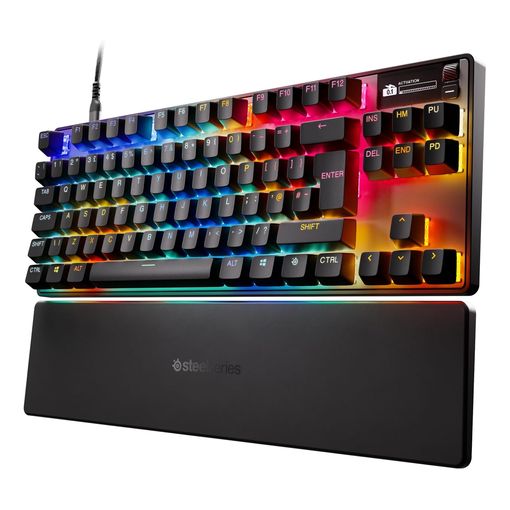
The Apex Pro TKL Gen 3 uses magnetic Hall Effect switches instead of a physical metal contact. That means the actuation point, how far you press before a keystroke registers, can be set anywhere from 0.1mm to 4.0mm per key1. Turn it down and every key fires almost the instant you touch it. Turn it up and you get more resistance to accidental presses. Layered on top is Rapid Trigger. It resets a key the moment you start releasing it, rather than waiting for the key to travel all the way back up. Rapid direction changes in a game register faster than a standard switch allows1.
None of that matters if you mostly write emails. The trade-off shows up in the price: this is the most expensive keyboard on this list, and the OLED display and rotary dial add cost without adding typing feel. It's also wired only, which some buyers with a tidy wireless setup will find annoying. Its review pool skews toward first-week enthusiasm, too: none of the visible verified-purchase reviews report back after real ownership time, so treat the glowing early reactions as exactly that rather than a proven long-term track record.
Where the Adjustable-Actuation Pick Stands Out
Build quality is solid rather than exceptional. An aluminum top plate and PBT keycaps hold up fine, though this isn't a metal-bodied board throughout. The review pattern doesn't flag anything unusual for a keyboard at this price. The OLED screen shows actuation depth and profile at a glance, a genuinely useful touch rather than a gimmick. SteelSeries earns its premium position through switch technology. Hall Effect and adjustable actuation used to be a boutique feature limited to a handful of expensive boards. Now it's mainstream enough to buy off the shelf with a real warranty behind it.
Keychron K10 Pro QMK/VIA Wireless Mechanical Keyboard
Best for Mac and Windows
based on 70 Amazon reviews (4.4★), adjusted for performance, build and value
The Case for the Cross-Platform Pick
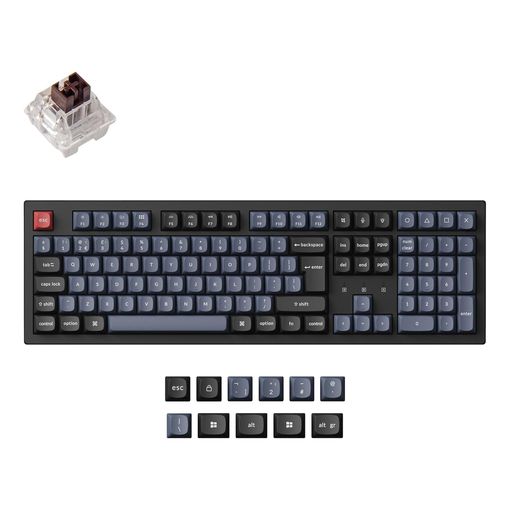
Most gaming keyboards assume you're on Windows and treat Mac support as an afterthought, if they support it at all. The K10 Pro flips that. It ships with a physical switch that remaps the Windows and Alt keys to Command and Option. Moving it between a Mac at home and a Windows laptop for work doesn't mean hunting through software every time. It pairs with up to three devices over Bluetooth 5.1 and holds a claimed 300 hours of use with the backlight off. That drops to around 100 hours with RGB running at its lowest brightness2.
At 108 keys, it's the only full-size board on this list. That means a proper number pad, but also the largest footprint by a wide margin. Its 70-review count on this listing is the thinnest of the six here. One buyer who'd fitted the red switch version said the PBT keycaps still "look brand new" after several weeks of ownership, an early but genuine signal that the keycap quality holds up to daily use. Weigh that against the strength of the spec sheet rather than treating it as a fully proven track record yet.
QMK/VIA and Hot-Swap: The Practical Detail
Keychron ships the K10 Pro with its own pre-lubed K Pro switches sitting in hot-swap sockets. If the stock feel isn't right, swapping in a different switch brand doesn't require solder. QMK and VIA support means every key can be remapped or turned into a macro, including the function row, through free, open-source software rather than a proprietary app tied to one platform. The aluminum frame and PBT keycaps are a step up from the plastic-cased budget boards in this list, though not as refined as the SteelSeries above it.
RK ROYAL KLUDGE RK84 Wireless Hot-Swappable Mechanical Keyboard
Best Budget Mechanical Keyboard
based on 568 Amazon reviews (4.4★), adjusted for performance, build and value
Why the Budget Pick Still Delivers
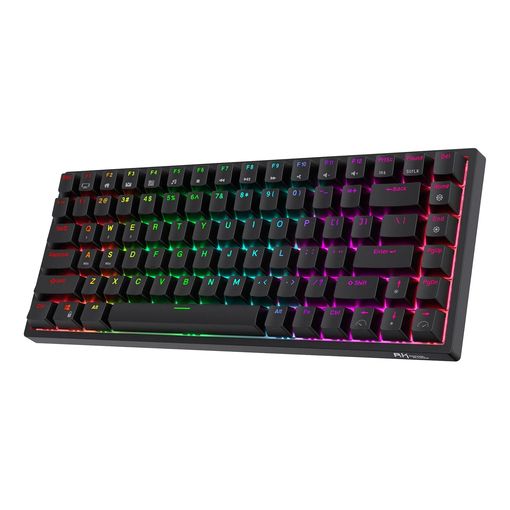
Hot-swap sockets and three-way connectivity used to be reserved for boards costing two or three times as much. The RK84 packs both into its 84-key 75% layout: Bluetooth, a 2.4GHz dongle, and wired USB-C. Its 3750mAh battery is rated for around 200 hours of use between charges, with a roughly six-to-seven hour full recharge3. With 568 reviews at a 4.4 average, it has by far the largest review base on this list, which counts for something when you're trusting a lesser-known brand. That volume doesn't quite translate into long-term proof, though: none of the visible reviews report back after real ownership time, so the 4.4-star average reads as a snapshot of early impressions rather than a tested multi-year record.
The honest trade-off is factory switch quality. Reviewers consistently describe the stock switches as scratchier and less consistent than the pricier boards here. The plastic case also has more flex than the aluminum-framed options. Hot-swap sockets are the fix, but only if you're willing to spend more on better switches separately. Skip that step and you're stuck with mediocre stock switches on a board that otherwise punches above its price.
Tri-Mode Connectivity: What You're Actually Getting
Three ways to connect one keyboard sounds like a marketing checkbox until you actually use it. Bluetooth suits a laptop on the move. The 2.4GHz USB dongle gives the lowest-latency wireless connection at a desk. Wired USB-C is the fallback when the battery runs out mid-session. RGB backlighting and swappable keycaps round out a feature set that's genuinely generous for the price tier, even if the material quality underneath doesn't fully match the spec sheet.
Logitech MX Mechanical Mini Wireless Illuminated Keyboard
Best for Quiet Office Typing
based on 287 Amazon reviews (4.4★), adjusted for performance, build and value
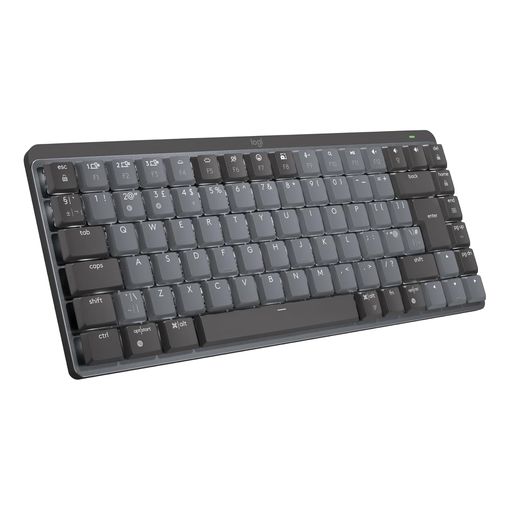
The Draw of the Quiet-Typing Pick
Open-plan offices and shared living spaces are where most mechanical keyboards fall down. The same click that feels satisfying alone is genuinely annoying to whoever sits nearby. The MX Mechanical Mini's Tactile Quiet switches keep a real tactile bump, so typing still feels deliberate, without the sharp click of a standard tactile or clicky switch. Logitech rates the battery at up to 15 days on a charge with the backlight on, stretching to around 10 months with it off4. The keyboard also switches between up to three paired devices at the press of a button, useful for anyone bouncing between a work laptop and a personal machine. One buyer reporting back after a month of regular use, around 40 hours a week with the backlight on its lowest setting, said they "still have not had to recharge."
It's a low-profile, compact board without a number pad, and it isn't hot-swappable. The switch feel you get is the one you're stuck with. Want a louder, more traditional mechanical sound later? This isn't the board that gets you there without a new purchase.
Tactile Quiet Switches and Multi-Device Pairing
Logitech also sells this same shell with Clicky or Linear switches, so the quiet variant here is a deliberate choice, not the only option available. The compact 65%-style layout and metal top plate keep it slim enough to sit under a laptop or travel easily. Logitech's long history in peripherals also means a proper multi-year warranty and support that's easy to find, something several of the newer boutique gaming-keyboard brands can't yet match.
Razer Huntsman V2 TKL Tenkeyless Gaming Keyboard
Best for Fast-Paced Gaming
based on 802 Amazon reviews (4.5★), adjusted for performance, build and value
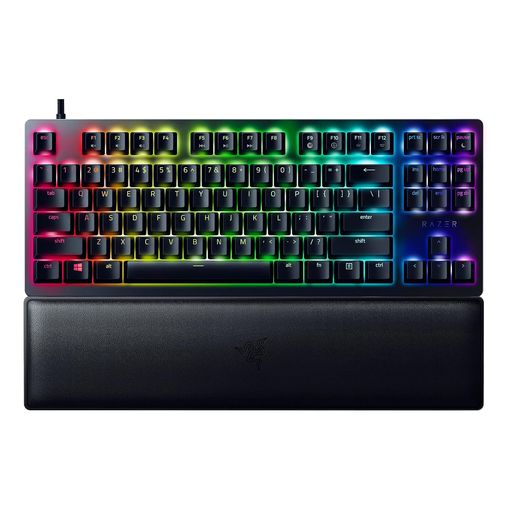
Near-Zero Latency, Explained
Standard mechanical switches close a physical metal contact to register a keystroke. That introduces a small amount of debounce delay while the switch settles. Razer's Gen-2 linear optical switches use a beam of light instead. A key press breaks the beam and the input registers immediately, with no metal contact bounce to filter out5. Razer's HyperPolling technology runs at a true 8000Hz on top of that. The Huntsman V2 TKL reports its state to a PC eight times more often per second than a standard 1000Hz keyboard. That shaves fractions of a millisecond off every input, in a game where that margin occasionally decides a round5.
Whether you can feel that difference depends heavily on the game and your own reaction time. Razer's own switch rating of 100 million keystrokes5 is a lab figure, not a guarantee against every failure mode reviewers report. Most complaints center on Bluetooth-adjacent USB dongle quirks rather than the switches themselves. It's also wired-only, so anyone wanting a tidy wireless desk should look elsewhere on this list. Its dedicated regional reviews section showed zero entries at the time of writing, so treat the switch-durability claims above as manufacturer figures rather than a verified long-term track record.
Gen-2 Optical Switches: All The Details
The included magnetic wrist rest is a genuinely nice inclusion at this price point. Doubleshot PBT keycaps mean the legends won't wear away the way cheaper ABS caps do after a year or two of daily gaming. At 802 reviews and a 4.5 average, this is the most reviewed keyboard on this list. That gives the strongest real-world confidence of the six that Razer's marketing claims broadly hold up in daily use.
Corsair K65 RGB Mini 60% Mechanical Gaming Keyboard
Best Compact Mechanical Keyboard
based on 628 Amazon reviews (4.6★), adjusted for performance, build and value
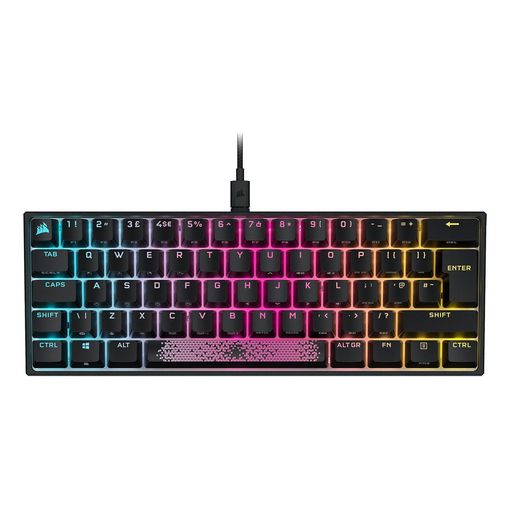
Living Without a Function Row
A 60% layout strips out the function row, arrow keys, and navigation cluster. What's left is roughly the width of the alphanumeric keys alone. Everything missing moves to a secondary Fn layer, so muscle memory has to be rebuilt over the first week or two. In exchange, you get a genuinely small footprint that leaves far more room for mouse movement. That matters more than it sounds for anyone playing games that rely on wide, low-sensitivity mouse swings.
Corsair's AXON processing pushes this board to native 8000Hz hyper-polling with 4000Hz key scanning6, the same input-speed pitch as the Razer above. It's built around genuine Cherry MX switches rather than a house-brand equivalent. The detachable USB-C cable and 628-review track record at a 4.6 average suggest Corsair's build quality claims hold up, though none of the visible reviews report back after months of ownership, so that read leans on first-impression reviews rather than a proven long-term record. Going without arrow keys full-time is still a real adjustment, not a minor one, and this listing's switch is a linear Red rather than the tactile Brown some office typists prefer.
AXON Hyper-Polling and Genuine Cherry Switches
The keyboard supports full per-key RGB backlighting and onboard profile storage through Corsair's iCUE software. Lighting and macro setups persist even when it's plugged into a different machine. If you already use a laptop stand to bring an external screen up to eye level, a 60% board like this is often the natural keyboard to pair with it. Desk space tends to be at a premium in that kind of setup too.
Kinesis Freestyle Pro QUIET Ergonomic Split Mechanical Keyboard
Best Ergonomic Split Keyboard
based on 290 Amazon reviews (4.3★), adjusted for performance, build and value
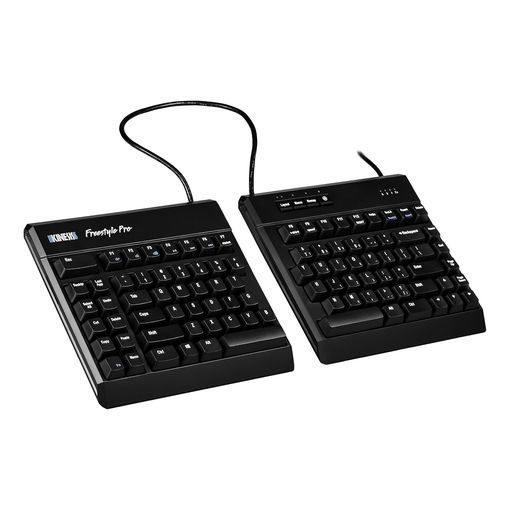
Splitting Up for a Healthier Typing Position
Every other keyboard on this list is one rigid slab, which forces your wrists to angle inward to reach the middle keys. The Freestyle Pro breaks that slab into two halves joined by a linking cable that stretches to allow up to 20 inches of separation, so each hand sits at whatever width and angle actually suits your shoulders. It sits flat rather than sloping up toward the back like most keyboards do, which is the detail that actually reduces wrist extension rather than just widening the gap between hands. None of the visible reviews we found establish a real ownership timeframe long enough to judge long-term reliability, so treat the early impressions as exactly that.
Cherry MX Silent Reds and the SmartSet Engine
The Cherry MX Silent Red switches underneath use a rubber dampener at both ends of the keystroke, so it's noticeably quieter than a standard mechanical switch without losing the light, linear feel gamers tend to prefer. Remapping doesn't need any software install: the onboard SmartSet engine handles macros, layout switching between Windows, Mac, and Dvorak, and full key remapping straight from the keyboard. Build quality is plastic rather than metal, and a handful of reviewers report individual keys failing within weeks, so this is a keyboard bought for the ergonomics rather than the switch durability. It's also the most expensive board in this lineup for what is, mechanically, a fairly simple pair of keyboard halves.
Redragon K552 Kumara Mechanical Gaming Keyboard
Best Entry-Level Mechanical Keyboard
based on 32841 Amazon reviews (4.2★), adjusted for performance, build and value
What a Rock-Bottom Price Actually Gets You
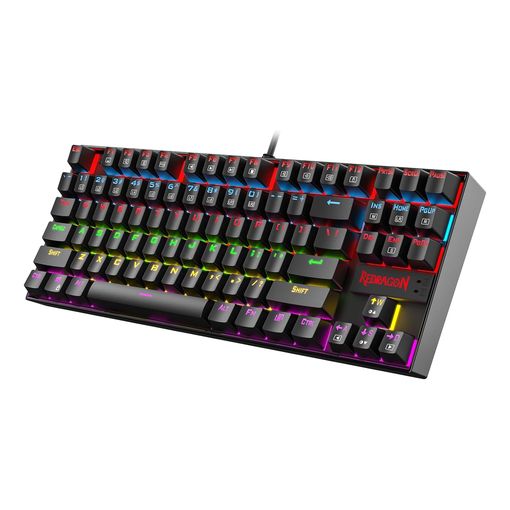
Genuine mechanical switches used to mean a genuine price tag, and the K552 is the reason that isn't true anymore. It's a tenkeyless board with anti-ghosting across all 87 keys, RGB backlighting, and a metal top rim, all sitting comfortably below what most of the other keyboards here cost. One buyer reporting back after a few months of regular use said there were "no issues to report" on a board bought as a gift, a solid early signal for a board built to a price. It's the single most-reviewed keyboard on this entire list by a huge margin, which counts for something when a brand is this unfamiliar next to Corsair or Razer.
Anti-Ghosting and the Metal Top Plate
The switches are a Cherry MX equivalent rather than the genuine article, and it shows in a slightly less refined feel than the pricier boards above it. Reviewers also describe an occasional individual key failure a few weeks or months in, most commonly reported on heavily-used keys. There's no hot-swap socket here, so a failing switch means living with it or opening the case to solder a replacement rather than pulling one out by hand. What you do get for the price is a real spring-loaded switch under every key, a durable frame, and none of the mushiness a membrane board has.
nuphy Air75 V3 Aluminum Wireless Mechanical Keyboard
Best Low-Profile Mechanical Keyboard
based on 121 Amazon reviews (4.0★), adjusted for performance, build and value
Thin Enough to Live Under a Laptop Riser
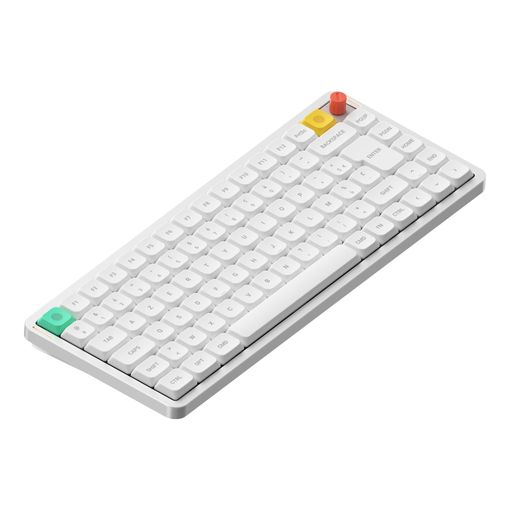
Every keyboard above sits tall because of the switch housings underneath. The Air75 V3 shrinks that down to 13.2mm thick by using low-profile switches with a shorter total travel, around 3.2mm rather than the 4mm or so a standard switch needs, so the keys still bottom out with a defined click rather than feeling like a laptop keyboard. It still hits the same 75% layout as several other boards here. It still takes hot-swappable switches too, so the slim profile isn't a trade against customization. Reviewers describe it as genuinely quiet and a favorite for shared desks, though none of the reviews we found establish a clear ownership timeframe, so we can't yet confirm how the low-profile switches hold up over months of daily use.
Low-Profile Switches and Multi-Device Pairing
A gasket-mounted plate sits between the switches and the aluminum frame, which is what keeps a thin board from sounding hollow or clattery. It pairs with up to four devices over Bluetooth, 2.4GHz, or USB-C, and switching between them is a single keypress rather than a settings menu. Worth flagging honestly: Amazon's own listing data shows this is a frequently-returned item, and reviews are split between people who call it the best low-profile board they've used and others who found the switches underwhelming for the price. A 4000mAh battery is generous for something this slim, easily running past a week of typical office use per charge.
EPOMAKER Ajazz AK820 Pro 75% Mechanical Keyboard
Best Gasket-Mount Typing Feel
based on 1492 Amazon reviews (4.6★), adjusted for performance, build and value
A Screen and a Gasket Mount for Less Than Expected
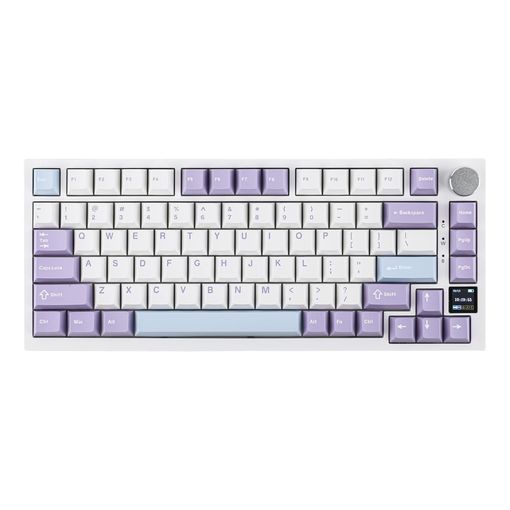
Gasket mounting is what separates a board that sounds hollow and clacky from one that sounds deep and cushioned, and it used to be a feature reserved for boutique keyboards costing several times as much. The AK820 Pro brings it down to an accessible price alongside pre-lubed switches that come smooth out of the box rather than needing modding. A small TFT screen sits in the top corner showing battery, connection mode, and the time, and it doubles as a Win/Mac toggle display so switching operating systems is one glance rather than a guess. Reviewers consistently single out the typing sound and feel as well above what the price would suggest, though few of them mention how long they've actually owned it, so we don't yet have a long-term durability signal to weigh against the glowing first impressions.
TFT Display, Software Caveats, and Switch Feel
It's genuinely hot-swappable and comes with a two-stage adjustable stand, so both switch feel and typing angle can be tuned without buying a different board. One caveat worth taking seriously: uploading custom images to the TFT screen requires a separate companion app, and at least one reviewer flagged that software as flagged by security tools and not worth the risk to install. Stick to the built-in backlight and screen modes and that concern doesn't come up. Everything else about the hardware, from the keycaps to the flex-cut plate underneath them, punches well above what the price tag suggests.
CORSAIR K70 CORE RGB Mechanical Wired Gaming Keyboard
Best Full-Size Gaming Keyboard
based on 210 Amazon reviews (4.4★), adjusted for performance, build and value
Room for a Numpad Without Losing Gaming Speed
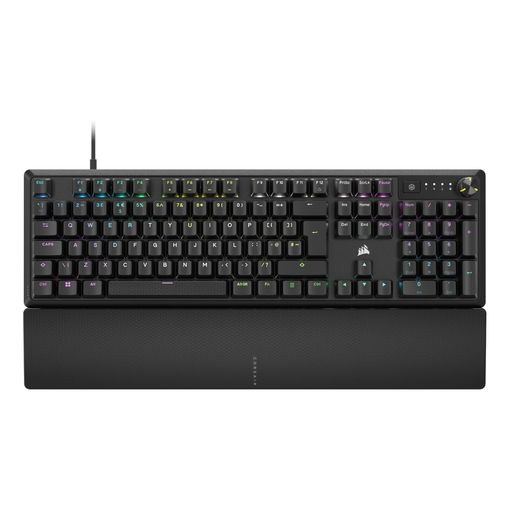
Both of the other gaming-focused picks on this list drop the number pad to save desk space. The K70 CORE keeps it, along with a media dial and a magnetic palm rest, aimed at anyone who wants a proper gaming board that still handles spreadsheet work without a separate numeric keypad plugged in. Its pre-lubed MLX Red linear switches ship with SOCD behavior built in. That means opposing key presses, like left and right at the same time, resolve instantly instead of both registering, which matters for the counter-strafing and quick direction changes competitive shooters reward7. One buyer who'd owned it for well over a year called it "very durable" with genuinely good lighting, though the same review flagged an ongoing double-typing issue on certain keys that firmware updates haven't fully resolved, an honest trade-off worth knowing before buying.
SOCD, the Media Dial, and a Recurring Complaint
The double-typing complaint shows up often enough across reviews that it isn't a one-off unit problem, so factor that risk in even though most owners don't report it. The aluminum top plate and two layers of sound dampening keep the noise more controlled than the K65 Mini above it, and the detachable magnetic palm rest is a genuine comfort upgrade over a bare keyboard edge, even if one reviewer found the magnet weaker than expected. Corsair's iCUE software draws mixed reactions in reviews, useful for lighting profiles but clunky to navigate, though the board's RGB and media controls work fine without ever opening it.
Best Mechanical Keyboard FAQ
What's the actual difference between linear, tactile, and clicky switches? Linear switches move straight down with no bump and no audible click. Gamers often prefer them for fast, repeated presses. Tactile switches add a small bump partway through the press that you can feel without a sound, a middle ground many typists like. Clicky switches add both the bump and an audible click, the loudest and most polarizing of the three. Genuine Cherry MX switches carry a manufacturer durability rating of over 50 million keystrokes across the range8.
Which switches sound best? This is genuinely subjective, and community opinion shifts constantly. A rough consensus among enthusiast keyboard communities holds that heavily-modified, lubricated linear or tactile switches on a well-built, dampened case produce the deepest, most "thocky" sound. Stock clicky switches on thin plastic cases tend to sound the thinnest and most polarizing. Take any single "best sounding switch" claim, including ours, as a starting point for testing, not a settled fact.
Which brand is considered best overall? There's no single answer that holds across gaming and typing use. Logitech and Keychron have the strongest reputation for typing-focused, cross-platform boards with long support windows. Razer, SteelSeries, and Corsair are the names most associated with competitive gaming features like adjustable actuation and high polling rates. Kinesis is the name to know for genuinely ergonomic split boards, while brands like NuPhy and Ajazz have carved out a reputation for boutique features, low-profile designs and gasket mounts, at prices that used to be reserved for enthusiast builds. Enthusiast-community favorites like Ducky sit in a smaller, pricier niche most casual buyers don't need to enter.
Do ergonomic split keyboards actually reduce wrist strain? A flat, split layout lets each hand find its own natural angle instead of both reaching toward a fixed center, which is the main mechanism behind the design. Whether that translates into less pain depends heavily on your existing posture, desk setup, and how consistently you use it, and it typically takes real time to adjust your typing habits to a split layout. Treat it as one part of a broader setup, alongside chair height and monitor position, rather than a single fix.
What does a gasket-mount keyboard actually do? Instead of screwing the switch plate directly to a rigid case, a gasket-mount design sandwiches it between soft silicone or foam gaskets. That isolates the plate from the case, so every keystroke gets a slight give and a deeper, more cushioned sound instead of a sharp, hollow clack. It's become common on budget boards recently, which is why boards like the Ajazz AK820 Pro can offer a typing feel that used to require a much pricier enthusiast build.
Is a low-profile mechanical keyboard less durable than a standard-height one? Not inherently. Low-profile switches use the same basic spring-and-contact mechanism as a standard switch, just with a shorter housing and less total travel. The bigger practical difference is choice: fewer switch options exist in low-profile form, and hot-swap sockets for them are less universal across brands, so replacing or upgrading one down the line is more limited than with a standard-height board.
Will a mechanical keyboard work with a Mac? Increasingly yes, but check before buying. Boards like the Keychron K10 Pro and Logitech MX Mechanical Mini ship with a dedicated switch or software toggle that remaps the Windows and Alt keys to Command and Option. Gaming-first boards built primarily for Windows sometimes work fine over USB but lack that remapping. You'll be living with mislabeled modifier keys unless you remap them yourself in macOS settings.
How long do mechanical switches actually last? Genuine Cherry MX switches are rated by Cherry for over 50 million keystrokes8. Optical switches like Razer's Gen-2 design are rated even higher, at 100 million5. In practice, the plastic keycaps, a USB cable, or a wireless battery usually need attention before the switches themselves wear out under normal use.
Does a hot-swappable keyboard actually matter for most buyers? It matters most on budget boards, where the stock switches are the most likely part to disappoint. Hot-swap sockets let you pull a switch out and push in a different one without soldering. A mediocre factory switch becomes a solvable problem rather than a reason to return the whole keyboard. On premium boards with genuinely good stock switches, it's a nice-to-have rather than essential.
Is a wireless mechanical keyboard slower than a wired one for gaming? A well-implemented 2.4GHz wireless connection can match wired latency closely enough that most players won't notice a difference. Bluetooth alone typically adds a small, perceptible delay compared to either. If you're chasing every fraction of a millisecond in a competitive shooter, wired or 2.4GHz-dongle wireless both beat a Bluetooth-only connection. For typing and general use, none of it is noticeable.
Do I need a wrist rest with a mechanical keyboard? It's not mandatory. Mechanical keyboards do tend to sit taller than membrane keyboards, because of the switch housings underneath, which can push wrists into a more angled position during long sessions. A wrist rest, included or bought separately, is a cheap way to keep the wrist closer to neutral. It pairs naturally with a raised external display setup too, like a laptop propped on a stand, where keyboard height matters more than usual.
The Best Mechanical Keyboard for You
The SteelSeries Apex Pro TKL Gen 3 earns the top spot on adjustable actuation and Rapid Trigger, genuine gaming advantages rather than marketing dressing. But it's overkill if you spend your day writing rather than gaming. Typists and cross-platform workers are better served by the Keychron K10 Pro or Logitech MX Mechanical Mini. Budget-conscious buyers get real hot-swap value from the Royal Kludge RK84, or step even further down in price with the Redragon K552 if hot-swap sockets aren't a priority. Anyone chasing the fastest possible input in a shooter should look at the Razer Huntsman V2 TKL or Corsair K65 RGB Mini, depending on how much desk space they're willing to give up, while the Corsair K70 CORE covers the same ground for anyone who still wants a numpad. Buyers dealing with wrist strain shouldn't overlook the Kinesis Freestyle Pro, and anyone chasing a premium typing feel without a premium price should put the Ajazz AK820 Pro near the top of their list. Pick the one that matches how you actually use a keyboard, not the one with the longest spec sheet.