


Best Baby Monitor for New Parents: Video, Audio & Wi-Fi

About the author...
Dave has been taking gadgets apart since he was old enough to be told not to. Every pick here is checked against the manufacturer's own documentation rather than the retail listing, and each star rating starts from a product's real Amazon customer score before being adjusted for performance, build quality, features and value. Read more about how ratings are calculated.
Table of contents
- Key Takeaways (TL;DR)
- How We Choose
- Quick Comparison
- Motorola Nursery VM483 Video Baby Monitor
- VTech RM5764-2HD Smart Wi-Fi Video Baby Monitor (2 Cameras)
- Motorola Nursery VM855 Connect Wi-Fi Video Baby Monitor
- eufy Baby Monitor C10
- Philips Avent DECT Audio Baby Monitor SCD733/26
- VTech BM1000 Digital Audio Baby Monitor
- Angelcare AC527 3-in-1 Movement, Sound & Video Baby Monitor
- HelloBaby HB6550 Split-Screen Video Baby Monitor
- Best Baby Monitor FAQ
- The Best Baby Monitor for You
The best baby monitor overall is the Motorola Nursery VM483. It earns that spot with a reliable local-only connection and a strong track record across hundreds of real reviews. See the comparison below for how seven other well-reviewed monitors compare if you want Wi-Fi remote access, two cameras out of the box, a movement sensor pad, or no camera at all.
A baby monitor has one job: let a parent hear, and often see, a sleeping baby from another room. That sounds simple, but it's easy to get wrong. The market splits into two real families of product. Video monitors add a camera and a screen, or an app, so you can check on your baby without walking in and risking waking them. Audio-only monitors skip the camera entirely and just pass sound. Some parents actively prefer that over having a camera in the nursery at all.
What separates a good monitor from a frustrating one usually isn't the spec sheet. It's whether the signal holds up through a couple of walls. It's whether "night vision" gives a usable picture or a grainy smear. And it's whether a Wi-Fi camera comes from a brand that takes security seriously, rather than one that just bolted on an app because the competition has one. We looked at all three.
Key Takeaways (TL;DR)
- Local signal range matters more than screen size for non-Wi-Fi monitors. Check the advertised distance and read reviews for real-world dropouts through walls.
- A Wi-Fi camera is another internet-connected device in your home. Pick a brand that documents its security practices, not just one with a slick app.
- Video resolution varies more than the box suggests. 720p is the norm, 1080p is a genuine step up, and night-vision quality differs a lot between otherwise similar cameras.
- Audio-only monitors are a legitimate, deliberate choice, not just a cheaper video monitor for people who couldn't afford a camera.
- Two-way talk and a temperature sensor are worth having. Lullaby libraries and light shows are nice extras that rarely decide the purchase.
- Parent-unit battery life ranges from a few hours to half a day or more. Check this if you plan to carry the unit around the house or into the garden.
- A monitor is not a safety device. Even the movement-sensor pad monitor in this lineup is not marketed as a SIDS-prevention tool, and none should be treated as a substitute for safe sleep practice.
How We Choose
We cross-checked resolution, range, and connection type against each manufacturer's own product page. Amazon's bullet points get this wrong often, since the same text gets recycled across different models in a range. Star ratings and review counts are pulled live from Amazon. Editorial scores for performance, build, features, and value are judged against the other monitors in this specific lineup, not the wider market. Where a brand makes a security or encryption claim, we looked for it directly on the manufacturer's own site rather than trusting marketing copy.
We don't run our own lab tests on these — no dedicated rig, no controlled conditions. What we do instead: read through the verified-purchase reviews in full, not just the star average, weighting the ones written weeks or months after purchase over launch-week first impressions, since that's where wear, reliability problems, and real-world performance gaps actually show up. Where a product genuinely lacks that kind of track record, we say so in its write-up rather than papering over it.
Quick Comparison
Each product's overall rating starts from its real Amazon customer rating, then gets adjusted (up to ±0.5) for real-world performance, build quality, features, and value. Click a product name to jump straight to its full review below.
| Product | Best For | Type | Key Detail | Connection |
|---|---|---|---|---|
|
Motorola Nursery VM483 Video Baby Monitor 4.3 |
Reliable video monitoring with no home network involved | Video baby monitor (no Wi-Fi) | Up to 1,000ft / 300m local range | 2.4GHz FHSS, no Wi-Fi or app required |
|
VTech RM5764-2HD Smart Wi-Fi Video Baby Monitor (2 Cameras) 3.7 |
Multi-room households that want two cameras from day one | Video baby monitor (Wi-Fi + local hybrid) | 2 cameras, 1080p via app | Wi-Fi + local hybrid, 360-degree pan and tilt |
|
Motorola Nursery VM855 Connect Wi-Fi Video Baby Monitor 3.9 |
Checking in remotely from work or another room | Video baby monitor (Wi-Fi app-based) | 720p live view via Motorola Nursery app | Wi-Fi app, portable battery-powered camera |
|
eufy Baby Monitor C10 4.5 |
Buyers who want the choice between Wi-Fi and fully local | Video baby monitor (switchable Wi-Fi/local) | 2K resolution, 12-hour parent unit battery | Hybrid local/Wi-Fi connection, 5,000mAh battery |
|
Philips Avent DECT Audio Baby Monitor SCD733/26 4.9 |
Parents who want reliable sound only, no camera in the room | Audio-only baby monitor | DECT digital connection, no camera | DECT technology, audio-only |
|
VTech BM1000 Digital Audio Baby Monitor 4.0 |
Budget-conscious parents who just need clear sound | Audio-only baby monitor | Up to 300m outdoor / 50m indoor range | DECT technology, mains-powered baby unit |
|
Angelcare AC527 3-in-1 Movement, Sound & Video Baby Monitor 4.4 |
Parents who want a movement sensor pad alongside video and audio | Movement sensor pad + video baby monitor | Under-mattress motion pad, alarms after 20 seconds of no movement | Non-contact movement pad, 4 adjustable sensitivity levels |
|
HelloBaby HB6550 Split-Screen Video Baby Monitor 4.7 |
Budget-conscious parents who may add more cameras later | Video baby monitor (no Wi-Fi, expandable) | 355-degree pan, expandable to 4 cameras, 30-hour ECO battery | 2.4GHz FHSS no-wifi, expandable multi-camera system |
Motorola Nursery VM483 Video Baby Monitor
Best Overall Baby Monitor
based on 913 Amazon reviews (4.1★), adjusted for performance, build and value
What We Love About the Overall Pick
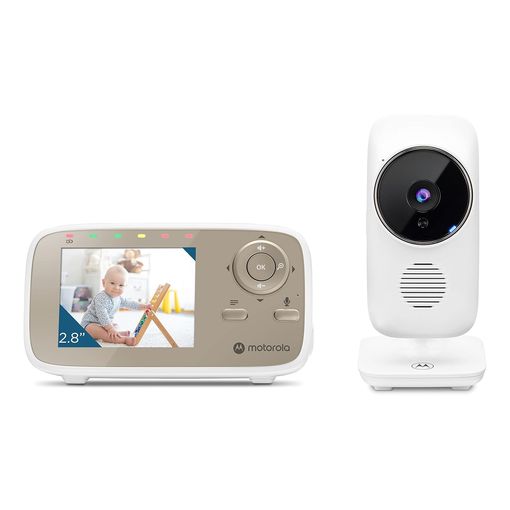
The VM483 doesn't win by piling on features. It wins by doing the core job of a video monitor with fewer things to go wrong. It has no Wi-Fi radio and no app, so there's no home network to depend on, no firmware to patch, and no cloud account to secure. Nearly a thousand reviewers back that up with a strong average rating. That's exactly the track record we want from a monitor a family relies on every night. Its dedicated regional reviews section was empty at the time of writing, though, so despite that large global review count there's no dated longevity signal to cite directly.
Overall Pick: All The Details
Motorola's own product page describes the VM483 as transmitting video and audio over 2.4GHz FHSS, with "no Wi-Fi or App needed."1 It gives a direct connection between camera and parent unit, rated for up to 1,000ft, or roughly 300 metres, line of sight. The parent unit has a 2.8-inch colour screen, digital zoom, infrared night vision, two-way talk, and a room temperature readout. What you give up next to the pricier picks below is remote viewing away from home, and a larger screen. This is a monitor for the nursery down the hall, not for checking in from the office.
VTech RM5764-2HD Smart Wi-Fi Video Baby Monitor (2 Cameras)
Best for Multi-Room Coverage
based on 518 Amazon reviews (3.6★), adjusted for performance, build and value
Two Cameras, One Box
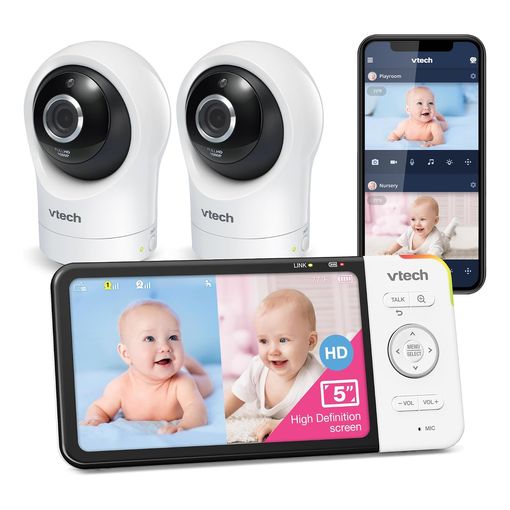
Families with more than one baby, or a baby and a toddler in separate rooms, don't want a second full monitor system just to cover a second door. This VTech ships with two cameras and a 5-inch parent unit that can flick between them. It also adds an app for remote viewing when you're not home. That makes it the most flexible setup in this lineup on paper. The parent unit doesn't strictly need the app to work, either. The local link between camera and screen runs independently of your home Wi-Fi, and only the remote-viewing feature needs a network connection. Its dedicated regional reviews section was empty at the time of writing, so unlike several other products here there's no dated ownership signal to weigh against the mixed global rating.
Multi-Room Setup: All The Details
VTech's own product listing confirms 1080p video over the app, with a 720p local feed on the 5-inch display.2 It also lists 360-degree pan and roughly 86-degree tilt, up to 10x zoom through the app, infrared night vision, and built-in temperature and motion-detection alerts that can trigger a recording. Set-up and app reliability are the two most common complaints in reviews. That shows up in a real-world Amazon rating that trails the other video monitors here. If you want the multi-camera flexibility and can tolerate an occasionally fiddly app, it's still a reasonable buy. If app stability is a dealbreaker, the VM483 above is the steadier choice.
Motorola Nursery VM855 Connect Wi-Fi Video Baby Monitor
Best for Remote Viewing
based on 220 Amazon reviews (3.8★), adjusted for performance, build and value
A Camera You Can Carry
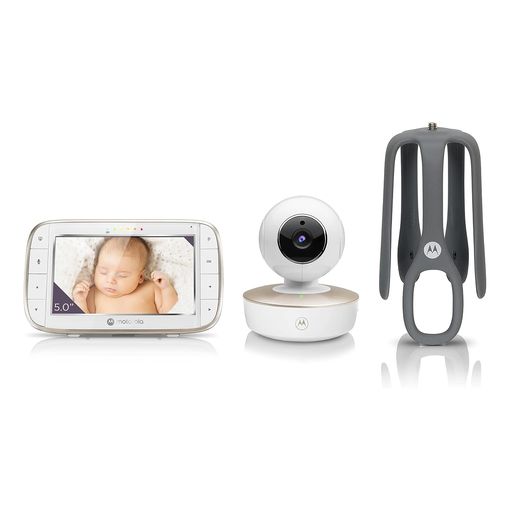
Unlike most video monitors, the VM855's camera runs on its own battery. You can unclip it and move it between rooms, a travel cot, or even a car seat for a nap in the garden. Pair that with the Motorola Nursery app and you get a live view whether you're upstairs or across town at work, on top of the standard 5-inch parent unit for use at home.
Portable Camera, App Access: All The Details
Motorola's own product page for the VM855 states the video runs at 720p through the app, with remote pan, tilt and zoom, a room temperature sensor, and two-way talk.3 It describes the connection as protected by what the company calls "triple-layer security," without publishing the underlying encryption standard. That vagueness is worth knowing before you buy. It's a reasonable security claim from an established brand, but it's marketing language, not a documented standard you can check yourself. Wi-Fi baby cameras have had real, disclosed vulnerabilities in the past.4 That's exactly why reading a brand's actual security page, not just its box copy, pays off. Reviews here are plentiful but split between happy long-term users and buyers who got a defective unit straight out of the box, and none of them report back with a specific ownership timeframe, so weigh the pairing complaints as a real risk rather than a settled verdict either way.
eufy Baby Monitor C10
Best Switchable Wi-Fi/Local Monitor
based on 69 Amazon reviews (4.3★), adjusted for performance, build and value
Wi-Fi When You Want It, Local When You Don't
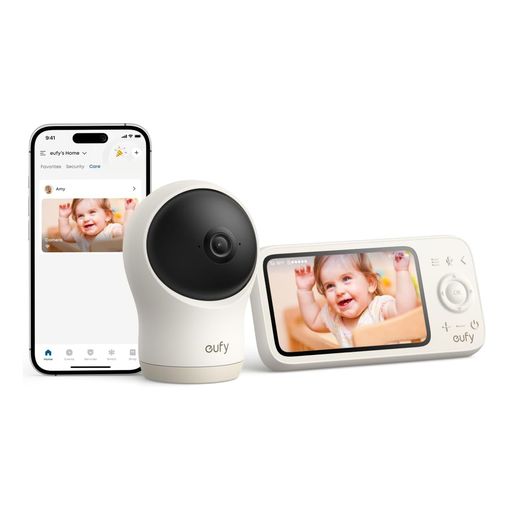
This is the one monitor in the lineup that refuses to force a choice between Wi-Fi and local-only. eufy describes the C10 as running on a hybrid connection.5 It gives a stable local feed to the parent unit with no Wi-Fi involved, but still allows app access when you're away from home and want it switched on. It's a newer release with fewer reviews than the rest of this list, so treat the rating as promising rather than fully proven. Its reviews are largely glowing on first use, but none of them report back with a specific ownership duration yet, so that promising rating is still short on the kind of months-later follow-up review that actually confirms durability.
Hybrid Connection: All The Details
The camera shoots at 2K resolution with a 351-degree pan and 60-degree tilt. The parent unit's 5,000mAh battery is rated for up to 12 hours of screen-on time, among the longest of any monitor here.5 It also does split-screen viewing if you add a second camera, plus motion, crying, loud-sound, and temperature alerts. One practical catch: only the parent display has a battery. The camera itself has to stay plugged into USB-C power, so it isn't something you can carry outside untethered the way the VM855's camera can.
Philips Avent DECT Audio Baby Monitor SCD733/26
Best Audio-Only Monitor
based on 2279 Amazon reviews (4.6★), adjusted for performance, build and value
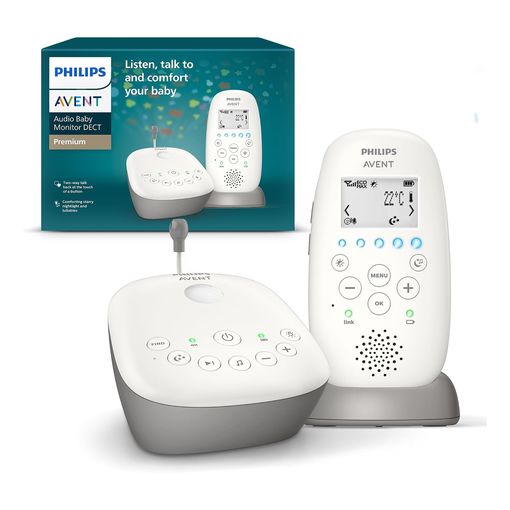
No Camera, and That's the Point
Plenty of parents don't want a camera streaming their nursery anywhere, ever. This Philips Avent monitor is built for exactly that preference. There's no lens, no app, and no account to set up. It's a dedicated audio link and nothing else. It also carries the highest customer rating and by far the largest review base of anything in this roundup. That says something about how well a simple job, done properly, holds up over years of real use, though the reviews visible at the time of writing were dominated by a batch of units shipped with the wrong regional plug rather than any report on ownership longevity itself.
Sound-Only by Design: All The Details
The monitor runs on DECT, the same digital cordless standard used in home phones. DECT spectrum is reserved exclusively for DECT devices, so it's designed to resist interference from Wi-Fi, Bluetooth, and other household wireless gear.6 This model adds a starry night-light projector, lullabies, and two-way talk on top of the core audio link. The tradeoff is obvious, and it's not a flaw. If you want to see your baby, not just hear them, this isn't the product. That's a deliberate, valid choice, not a compromise.
VTech BM1000 Digital Audio Baby Monitor
Best Budget Monitor
based on 1774 Amazon reviews (3.9★), adjusted for performance, build and value
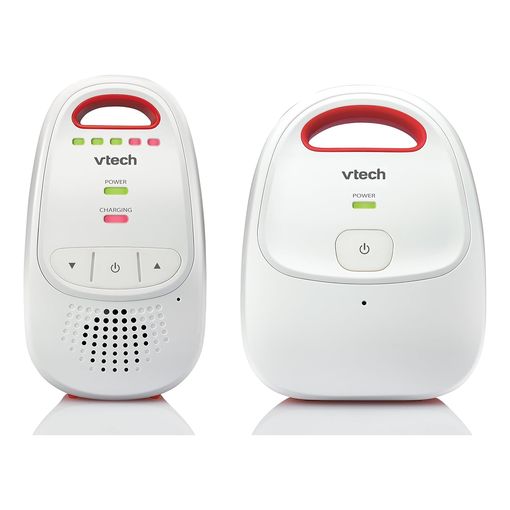
The No-Frills Option
Sitting at the accessible end of the lineup, the BM1000 strips a baby monitor down to its essentials. You get sound, a rechargeable handheld parent unit, and a five-level LED indicator, so you can gauge how loud the room is without turning the volume up in the middle of the night. Nearly 1,800 reviewers have put it through years of nightly use. That's a decent amount of proof for something this simple. One buyer kept updating the same review across several years of parenting two children on it, and by the final update it was "now about 7 years old and still going strong," about as thorough a real-world longevity test as a budget monitor gets.
Sound and Nothing Else: All The Details
VTech's own specifications list an indoor range of up to 50 metres and an outdoor range up to 300 metres, using DECT digital technology for a clear, low-interference connection.7 The parent unit runs on two rechargeable AAA cells. The baby unit, though, is mains-powered only and has no battery backup, so a power cut in the nursery takes the whole system down. There's no screen, no camera, and no app. For parents who've already decided they want audio-only and just need the cheapest reliable option, it's a sound pick. For anyone still weighing video against audio, the Philips Avent above has a longer, more consistent review history.
Angelcare AC527 3-in-1 Movement, Sound & Video Baby Monitor
Best Movement & Breathing Monitor
based on 325 Amazon reviews (4.3★), adjusted for performance, build and value
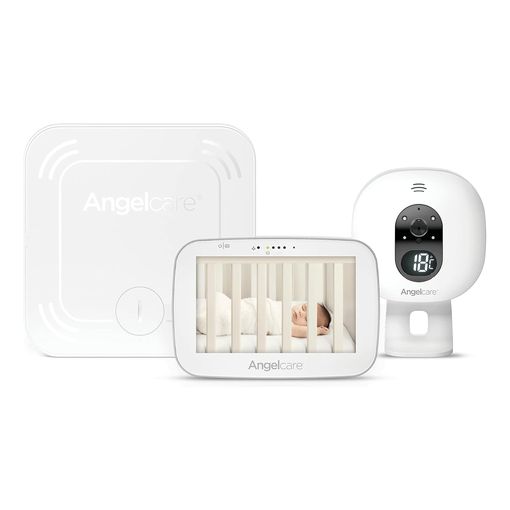
What We Love About the Movement Sensor Pick
Every other monitor in this list relies on a camera, a microphone, or both. The AC527 adds a third layer: a thin pad that slides under the mattress and tracks whether the baby is moving, sounding an alarm if it detects no movement for 20 seconds. Buyers who picked it specifically for that pad tend to be the happiest with it. One called it the main reason for the purchase and said it "meets requirements better than others on the market," particularly for a baby who sleeps on their front. That's not the whole picture, though. One reviewer reported that six months after use, the parent unit was "now not switching on." They added that on Angelcare's own support community, this "is not an uncommon issue," not a one-off fault.
Movement Pad and Video, Combined: All The Details
The AC527 pairs a wireless movement sensor pad with a 5-inch touchscreen parent unit, a nursery camera with night vision and a colour-changing temperature display, and two-way audio. The pad itself offers 4 adjustable sensitivity levels and sits entirely under the mattress, with no contact against the baby. It's worth being direct about what this device is and isn't. Movement and breathing monitors like this one are not shown to reduce the risk of SIDS, a point paediatric guidance is explicit about8, so it's best treated as an added layer of reassurance rather than a medical safety device. It's also the priciest product in this lineup, and the extra hardware is one more thing that can fail: reviews mention a fragile screen and a wobbly camera mount alongside the praise for the sensor itself.
HelloBaby HB6550 Split-Screen Video Baby Monitor
Best No-Wifi Multi-Camera Monitor
based on 1666 Amazon reviews (4.4★), adjusted for performance, build and value
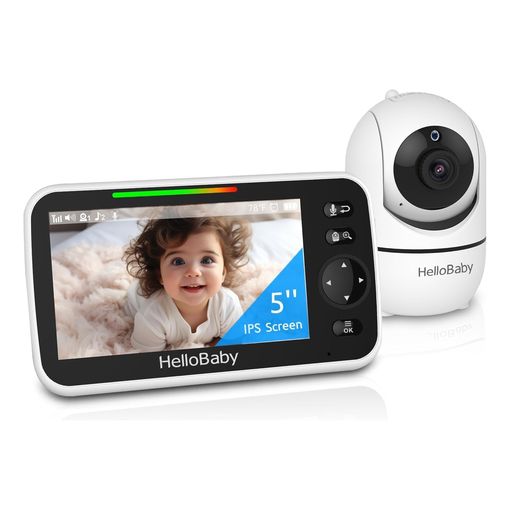
Why the Split-Screen Value Pick Earns Its Spot
HelloBaby undercuts every other video monitor in this lineup on price while still offering split-screen viewing between two cameras, a 5-inch display, and no Wi-Fi radio to depend on. Setup gets praised consistently: several buyers describe having a working picture within minutes, and one grandparent using it to check on a granddaughter called it "a really useful and easy-to-use monitor" and "great value for money." It also carries more reviews than any other product in this roundup, nearly 1,700 of them, holding a 4.4-star average across that volume. None of the reviews we found established a clear multi-year ownership timeframe for this specific model, so treat that strong average as an encouraging early signal rather than a long-proven one.
Split-Screen and Expandable: All The Details
The camera pans 355 degrees and tilts 120 degrees, and the parent unit can split its 5-inch display between two cameras at once when a second is added. HelloBaby's own product page states the wider HB6550 family can expand to as many as four cameras total for monitoring multiple rooms9. Only two show on screen at once on this particular model, though. Range tops out at 1,000ft in open conditions, and the battery stretches to roughly 30 hours in the power-saving ECO mode. What you give up at this price is Wi-Fi remote access and a companion app. This is a local-only system by design, which is exactly why it sidesteps the hacking risk raised earlier in this roundup.
Best Baby Monitor FAQ
What's the real difference between Wi-Fi and non-Wi-Fi baby monitors? Non-Wi-Fi monitors use a dedicated short-range radio link, usually 2.4GHz FHSS or DECT, straight between the camera and a handheld parent unit. That connection doesn't touch your home network or the internet. There's no cloud account and no remote access, but also nothing to hack from outside your house. Wi-Fi monitors route some or all of the video through an app instead. That enables remote viewing from anywhere, but it also means the camera is a networked device like any other in your home.
Is a Wi-Fi baby monitor safe from hacking? It can be, but that depends entirely on the manufacturer. It's worth checking rather than assuming. Wi-Fi baby cameras have had real, publicly disclosed vulnerabilities before, later patched. A 2021 remote-code-execution flaw affecting a range of Motorola-branded nursery cameras is a documented example, tracked as CVE-2021-3577 and fixed with a firmware update after responsible disclosure.4 That's not a reason to avoid every Wi-Fi monitor. A patched product from an established brand is a different risk than an obscure drop-shipped camera. But it is a reason to prefer a brand that publishes its security practices and keeps shipping firmware updates.
Do I need video, or is audio enough? Audio-only is a completely valid choice, not a downgrade. Many parents find that hearing a baby is all they need, especially once a baby is a little older and stirs less often. Audio monitors are simpler and cheaper, and there's no camera to worry about securing. In our lineup, the audio-only Philips Avent has the highest customer rating of any product here. Choose video only if you actually want the picture, not just by default.
What does "night vision" actually mean on a baby monitor? Nearly every video baby monitor advertises night vision, but the quality varies a lot. Almost all of them use infrared LEDs to make a black-and-white image in the dark. That's not the same as true colour low-light imaging. How much detail you actually see depends on the camera's sensor and its IR LEDs. Neither shows up clearly on an Amazon listing. If night-time detail matters to you, read reviews for night-vision clarity specifically. Don't trust the spec sheet. Don't trust the marketing photo either; it's often shot in a lit room and edited to look dark.
How much range do I actually need? More than you'd think. Walls, floors, and other 2.4GHz devices all cut into the advertised line-of-sight figure. That includes Wi-Fi routers, microwaves, and other baby monitors nearby. A monitor rated for 300 metres outdoors might realistically cover one or two floors of a typical house. DECT-based audio monitors are built to resist interference from other wireless devices, because DECT spectrum is reserved exclusively for DECT use.6 That's one reason audio monitors often have a reputation for a steadier connection than Wi-Fi video monitors in a crowded household.
How long does the parent unit's battery last? It varies enormously between products, from a few hours to half a day or more on a single charge. Manufacturers don't always publish the figure clearly, either. If you plan to carry the parent unit around the house or into the garden, check the battery spec specifically. Don't assume it. A monitor that's excellent at the desk but dies after two hours untethered won't suit an active household.
Can I add more cameras later? Sometimes, but check before you buy, not after. Some systems, like the VTech RM5764-2HD reviewed above, ship with two cameras and let you view multiple feeds from one parent unit and app. Others, like the HelloBaby HB6550, are sold as a single camera to start but belong to a wider product family that officially supports up to four cameras total. Others still are built as a single camera and parent unit pair, with no official way to expand at all. If multi-room coverage matters to you, buy a system sold as expandable from the start, or confirm with the manufacturer that add-on cameras exist for that specific model.
Do movement or breathing sensor pads reduce the risk of SIDS? No, and reputable paediatric guidance is explicit on this point. Home movement and cardiorespiratory monitors, including under-mattress sensor pads like the one on the Angelcare AC527 reviewed above, are not shown to reduce the risk of SIDS. They shouldn't be used as a strategy to try to do so8. They can offer genuine reassurance, and they can prompt a parent to check on a baby sooner. But they are consumer reassurance products, not medical devices, and no monitor in this roundup is marketed or should be treated as one. Safe sleep practice, not monitoring hardware, is what the evidence actually supports, and specific guidance can vary slightly by country, so check your own national health authority's current recommendation.
Does a baby monitor replace safe sleep practices? No, and no monitor in this roundup claims otherwise. The American Academy of Pediatrics is explicit that consumer baby monitors, including video monitors, aren't held to the same standard as medical devices and shouldn't create a false sense of security.8 Its guidance points to a firm, flat sleep surface, sleeping on the back, and room-sharing without bed-sharing as the practices that actually reduce risk, not a camera in the room. A monitor is a convenience for checking on a sleeping baby, not a piece of safety equipment. Exact safe-sleep guidance can vary slightly by country, so check your own national health authority's current recommendation too.
The Best Baby Monitor for You
If you want the simplest, most proven video monitor with nothing to configure, the Motorola VM483 is the safest bet. Families juggling more than one room should look at the VTech RM5764-2HD's two-camera bundle, the eufy C10's hybrid connection, or the HelloBaby HB6550 if price matters most and Wi-Fi doesn't. Parents who want a live view from outside the house will get the most out of the VM855's portable camera and app, while anyone who wants an extra layer of reassurance beyond video should look at the Angelcare AC527's movement sensor pad. If you've decided you don't want a camera at all, the Philips Avent SCD733/26 is the best-reviewed option here by a wide margin, with the VTech BM1000 covering the same ground for less if you don't need the extras.