

Best Monitor Arm for a Cleaner, More Ergonomic Desk

About the author...
Dave has been taking gadgets apart since he was old enough to be told not to. Every pick here is checked against the manufacturer's own documentation rather than the retail listing, and each star rating starts from a product's real Amazon customer score before being adjusted for performance, build quality, features and value. Read more about how ratings are calculated.
Table of contents
- Key Takeaways (TL;DR)
- How We Choose
- Quick Comparison
- Ergotron LX Premium Monitor Arm, Single Monitor Desk Mount
- BONTEC Single Monitor Arm Desk Mount
- VIVO Single Monitor Arm Desk Mount
- HUANUO Dual Monitor Stand for 13 to 32 Inch Screens
- Ergotron HX Premium Heavy Duty Monitor Arm
- Suptek Monitor Arm with Laptop Tray
- WALI Free Standing Triple Monitor Stand, MF003
- PUTORSEN Monitor Arm Wall Mount Bracket, 17-42in
- Duronic Monitor Arm Stand DM453VX1, Quad PC Desk Mount
- Best Monitor Arm FAQ
- The Best Monitor Arm for You
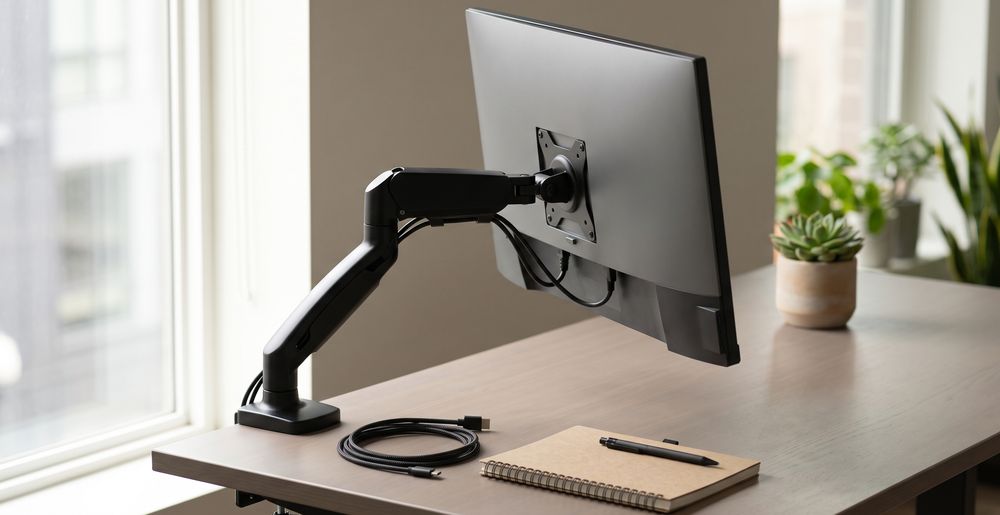
The best monitor arm for most people is the Ergotron LX Premium Monitor Arm, thanks to a genuinely smooth gas-spring lift that holds its position under real monitor weight and a wide 3.2-11.3kg capacity that covers almost any single display. See the comparison below for how eight other well-reviewed alternatives stack up depending on whether you run two screens, three or four screens, an ultrawide, or a tight budget.
A monitor arm does one job: it gets your screen off the desk stand it shipped with. That lets you actually position it, at the right height, the right distance from your face, and angled to cut glare. That sounds minor until you've used one. A fixed desk stand puts the screen wherever its base happens to land, and adjusting it usually means picking the whole monitor up. An arm swings, tilts, and lifts with one hand, and a good one holds that position for years without drifting or squeaking.
The gap between a good arm and a bad one shows up in two places. Does it actually hold your monitor's real weight without sagging? And does the mounting hardware fit your monitor's VESA pattern and your desk's edge? Get either wrong and you've bought a wobbly shelf instead of an adjustable one.
Key Takeaways (TL;DR)
- Weight capacity is the number that matters most; check your monitor's actual weight against the arm's rated range, not just its screen size.
- VESA mount compatibility (75x75mm or 100x100mm) is what lets the arm attach to your monitor at all, and it's worth confirming before you buy either one.
- Gas-spring arms hold position with a smoother, more adjustable feel than basic mechanical-spring designs, and it's the feature that separates a good arm from a cheap one.
- A tall pole and independent arms are what make dual and triple monitor setups actually usable, not just physically possible.
- Clamp, grommet, or wall mounting cover most setups, but check your desk's edge thickness, whether a cable hole works for you, and whether a wall stud is available if you'd rather skip the desk entirely.
- A monitor arm won't fix eye strain or screen glare on its own. Positioning still matters more than the mount itself.
- Typical lifespan runs several years for a quality gas-spring arm; the spring tension and clamp hardware are usually the first things to loosen.
How We Choose
We weighed each arm's real weight capacity and VESA compatibility against its own listing and, where we could, the manufacturer's own spec page, rather than trusting the headline screen-size claim alone. Build quality was judged on the mounting hardware, the smoothness and reliability of the height mechanism, and whether reviews showed a pattern of sagging or squeaking over time. We also looked at practical setup factors: clamp versus grommet mounting, cable management, and whether a design was actually built for two screens rather than a single arm split in half.
We don't run our own lab tests on these — no dedicated rig, no controlled conditions. What we do instead: read through the verified-purchase reviews in full, not just the star average, weighting the ones written weeks or months after purchase over launch-week first impressions, since that's where wear, reliability problems, and real-world performance gaps actually show up. Where a product genuinely lacks that kind of track record, we say so in its write-up rather than papering over it.
Quick Comparison
Each product's overall rating starts from its real Amazon customer rating, then gets adjusted (up to ±0.5) for real-world performance, build quality, features, and value. Click a product name to jump straight to its full review below.
| Product | Best For | Type | Key Detail | Weight Capacity |
|---|---|---|---|---|
|
Ergotron LX Premium Monitor Arm, Single Monitor Desk Mount 4.9 |
Most people wanting one reliable arm for almost any monitor | Single monitor arm | 3.2-11.3kg, up to 34in | Constant Force gas spring, VESA 75/100mm |
|
BONTEC Single Monitor Arm Desk Mount 4.8 |
Buyers wanting Ergotron-style flexibility for less | Single monitor arm | Up to 10kg, 13-32in | Gas spring, C-clamp or grommet mount |
|
VIVO Single Monitor Arm Desk Mount 4.4 |
Budget shoppers who still want gas-spring smoothness | Single monitor arm | Up to 10kg (22lb), 13-32in or 38in ultrawide | Gas spring, C-clamp/grommet, cable channel |
|
HUANUO Dual Monitor Stand for 13 to 32 Inch Screens 4.9 |
Anyone running two monitors side by side | Dual monitor arm | 2-9kg per arm, 13-32in | Independent gas-spring arms, VESA 75/100mm |
|
Ergotron HX Premium Heavy Duty Monitor Arm 4.9 |
Heavy or ultrawide displays other arms can't support | Heavy-duty single monitor arm | 9.1-19.1kg, up to 49in | Constant Force gas spring, standard pivot |
|
Suptek Monitor Arm with Laptop Tray 4.8 |
Desks combining a laptop and an external monitor | Monitor arm with laptop tray | 13-27in screen + tray for up to 15.6in laptop | Laptop tray plus VESA arm combo |
|
WALI Free Standing Triple Monitor Stand, MF003 4.3 |
Triple-screen setups on desks that can't be clamped or drilled | Triple monitor arm | 10kg per arm, up to 27in each | Freestanding V-base, VESA 75/100mm |
|
PUTORSEN Monitor Arm Wall Mount Bracket, 17-42in 4.8 |
Desks too thin, cluttered, or unclampable for a normal arm | Wall-mounted monitor arm | 12kg capacity, 17-42in screens | Gas spring, VESA 75/100mm, permanent wall mount |
|
Duronic Monitor Arm Stand DM453VX1, Quad PC Desk Mount 4.6 |
Traders and power users running four monitors from one desk | Quad monitor arm | 6kg per screen, four 15-27in displays | Die-cast aluminium, VESA 75/100mm, 360-degree rotation |
Ergotron LX Premium Monitor Arm, Single Monitor Desk Mount
Best Monitor Arm Overall
based on 9597 Amazon reviews (4.6★), adjusted for performance, build and value
What We Love About the Overall Pick
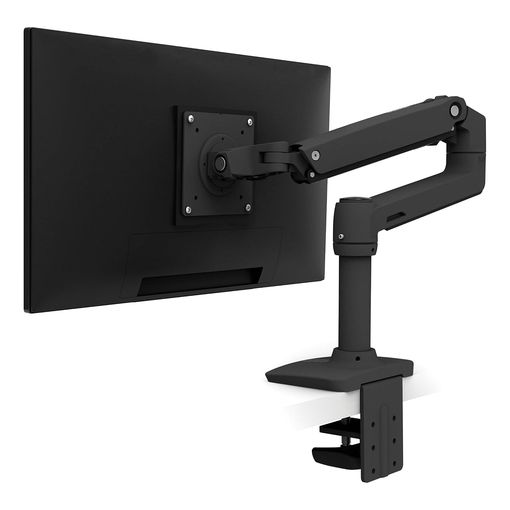
Ergotron built its reputation on the gas-spring mechanism inside this arm, and it's easy to feel why once you've used one. Push the screen up, down, or to the side and it stays exactly where you leave it, with none of the drift or sag that cheaper mechanical-spring arms develop after a few months of daily use. The rated capacity runs from 3.2 to 11.3kg, which covers the overwhelming majority of monitors people actually own, including curved ultrawides up to 34 inches. One buyer running an older 34-inch Alienware monitor at maximum horizontal extension reported back after a few weeks of use with "no issues," even at that heavier, fully-extended setup. Nearly 9,600 reviews at 4.6 stars back that reliability up over a long track record rather than a few months of hype.
The Overall Pick: All The Details
The arm mounts via a two-piece desk clamp, with VESA 75x75mm and 100x100mm compatibility covering the vast majority of monitors sold today. Tilt, pan, and 360-degree rotation are all built in, and a channel along the arm keeps cables tucked away instead of hanging loose. Ergotron backs the LX with a multi-year warranty, longer than most of the budget arms in this roundup offer. That matters, given how many moving joints are doing real work every time you reposition the screen. The tradeoff is straightforward: this is the most expensive single arm here. Buyers who just want basic height adjustment, without the smooth gas-spring feel, can get most of the way there for meaningfully less with the mid-range pick below.
BONTEC Single Monitor Arm Desk Mount
Best Mid-Range Monitor Arm
based on 11036 Amazon reviews (4.5★), adjusted for performance, build and value
The Case for the Mid-Range Pick
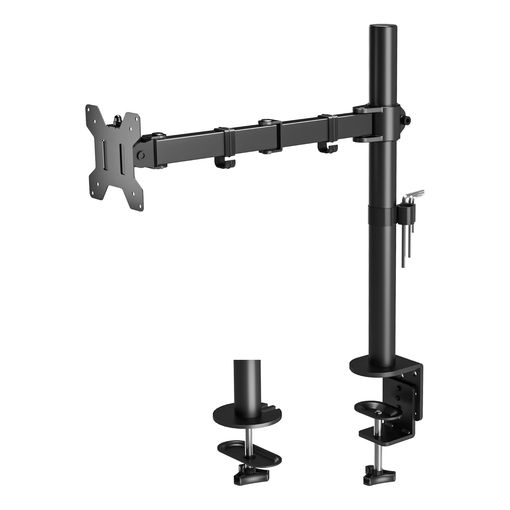
This is where most buyers land once they compare the Ergotron's price against what BONTEC offers for considerably less. It's still a gas-spring arm, still supports up to 10kg across a 13 to 32-inch screen range, and still gives you tilt, swivel, and full 360-degree rotation. Over 11,000 reviews sit at 4.5 stars, a large enough sample to trust, and BONTEC's own listing matches what the arm actually delivers rather than overselling a headline number. One owner reporting back after just over a year of ownership found the monitor's weight had gradually let the arm drop, but a quick pass with the included Allen key on the tensioning bolts brought it right back into position.
Mid-Range Pick: What's in the Box
BONTEC includes both a C-clamp and a grommet base in the box, so the same arm works whether you're mounting to a solid desk edge or drilling a cable hole through the surface. VESA 75x75mm and 100x100mm mounting covers the same range of monitors as the pricier picks here. Build quality relies on steel rather than the aluminum used in Ergotron's arms, which adds a bit of weight but keeps the price down. It won't feel quite as buttery smooth as the LX when you first move it, and BONTEC's support and warranty presence is smaller than an established brand like Ergotron's. For most home offices running a single 24 to 27-inch monitor, that difference won't matter day to day.
VIVO Single Monitor Arm Desk Mount
Best Budget Monitor Arm
based on 19544 Amazon reviews (4.2★), adjusted for performance, build and value
Why the Budget Pick Still Works
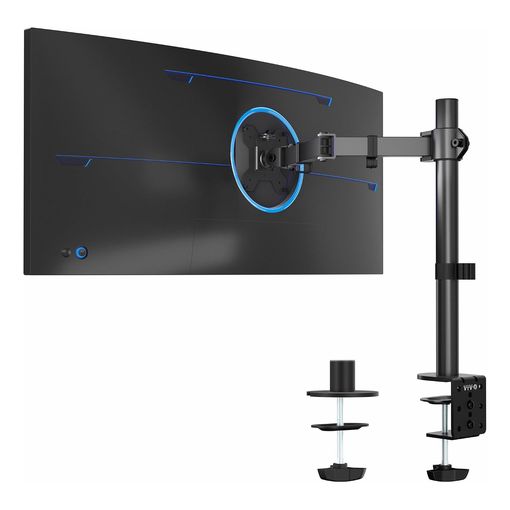
With over 19,500 reviews, this is the single most-purchased arm in this entire roundup, and at 4.2 stars it's also the lowest-rated. That's not a coincidence. VIVO's own spec page confirms a 22lb (10kg) capacity across 13 to 32-inch monitors and 38-inch ultrawides, essentially matching the pricier arms on paper1. In practice, a chunk of the review base reports the gas spring losing tension at the heavier end of that range faster than a premium arm would. None of its reviews we checked reported back after weeks or months of real ownership, either, so the sag complaints above are best read as a pattern across many buyers rather than a single verified long-term account.
Budget Pick: Where the Savings Show
The arm mounts with either a C-clamp or a grommet base, has a built-in cable channel running down the pole, and covers the same VESA 75x75mm and 100x100mm patterns as everything else here1. For a lighter 24-inch monitor sitting comfortably under the rated capacity, most buyers report it holds position fine. Push it toward a heavier 32-inch or curved ultrawide panel and you're more likely to notice occasional drift, which is exactly the kind of tradeoff a lower build score should flag. If your monitor sits in the middle of its weight range rather than at the top, this is a genuinely reasonable way to get gas-spring convenience without paying premium prices.
HUANUO Dual Monitor Stand for 13 to 32 Inch Screens
Best Dual-Monitor Arm
based on 11976 Amazon reviews (4.6★), adjusted for performance, build and value
Handling Two Screens Without a Second Desk
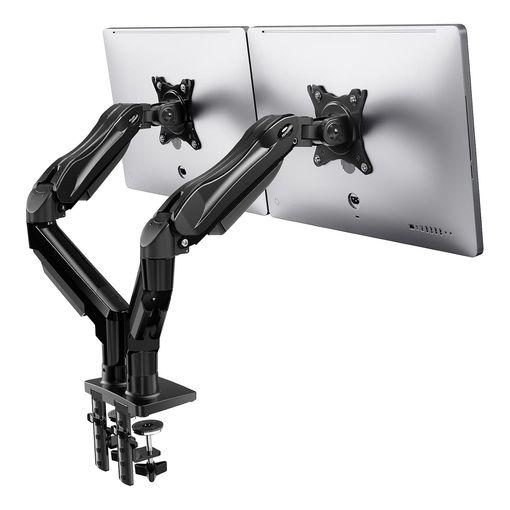
Running two monitors on separate fixed stands eats desk space fast, and it's nearly impossible to line the screens up at matching heights without an arm doing the work. HUANUO's dual stand gives each monitor its own independent gas-spring arm, so you can raise, tilt, and angle one screen without disturbing the other. HUANUO's own product page confirms a 2 to 9kg capacity per arm across 13 to 32-inch monitors, matching what the product listing states, and nearly 12,000 reviews sit at 4.6 stars2. None of its reviews established a genuine long-term ownership timeframe at the time of writing, so that review volume is the honest limit of its track record rather than a first-hand months-or-years account.
What the Dual-Arm Design Gets Right
A single clamp base carries both arms, with VESA 75x75mm and 100x100mm compatibility per arm and both C-clamp and grommet mounting included2. Each screen adjusts independently for height, tilt, swivel, and rotation, which matters more than it sounds like it should once you're actually trying to match two different monitor models at the same eye level. The compromise is capacity: at 9kg per arm, this isn't built for a pair of large ultrawides. It's aimed squarely at the common two-monitor office setup of matched or near-matched 24 to 27-inch screens, and that's exactly where it performs best.
Ergotron HX Premium Heavy Duty Monitor Arm
Best Monitor Arm for Ultrawide and Heavy Displays
based on 900 Amazon reviews (4.6★), adjusted for performance, build and value
Built for the Displays Other Arms Can't Carry
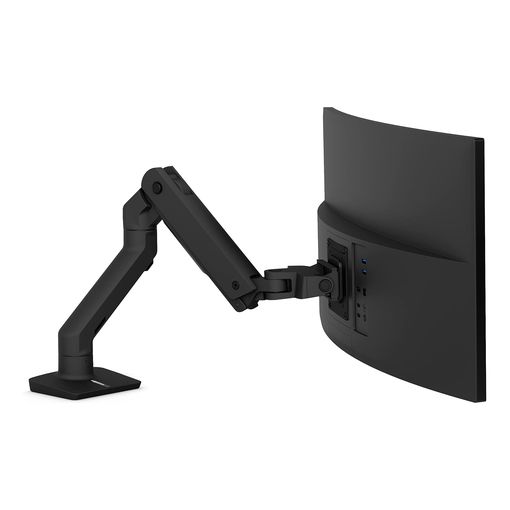
None of the other five arms in this roundup are rated for what the HX handles. Its Constant Force gas-spring mechanism is built specifically for large, heavy panels, rated from 9.1 to 19.1kg and supporting flat or slightly curved monitors up to 49 inches diagonal. That's the exact weight and size range where a standard single arm starts sagging or simply can't reach its rated tension. Nearly 900 reviews hold a 4.6-star average, a smaller sample than some picks here but a consistent one for a product aimed at a narrower slice of buyers. None of its reviews we checked reported back with a specific ownership timeframe either, so that smaller review count is the honest limit of its track record rather than a confirmed years-long account.
Why This Exists as a Separate Product
Ergotron doesn't just scale up the LX's spring for this arm; the HX uses a different internal mechanism engineered around sustained heavy loads rather than typical desktop monitor weights. VESA compatibility and the desk-clamp mounting system carry over from the LX, so if you've used an Ergotron arm before, the adjustment feel will be familiar even though the hardware inside is different. What you're not getting here is a dual-arm option or the lower price of the mid-range and budget picks. This is a single-purpose tool built for one specific problem: a 34-inch-plus ultrawide or a large secondary display used as a monitor. If your screen fits comfortably within the LX's range, you don't need this arm and shouldn't pay for it.
Suptek Monitor Arm with Laptop Tray
Best Monitor Arm for Laptop-and-Monitor Setups
based on 1612 Amazon reviews (4.6★), adjusted for performance, build and value
Solving a Different Problem Entirely
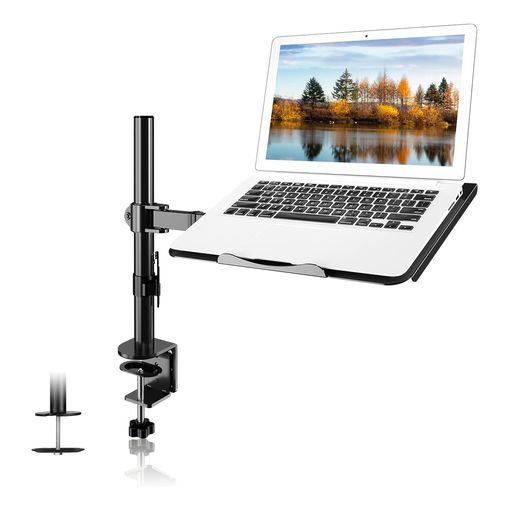
A lot of home workers aren't choosing between a monitor and a laptop; they're running both, with the laptop acting as a second screen or a docking point next to a larger external display. This Suptek arm ships with both a laptop tray sized for notebooks up to 15.6 inches and a standard VESA bracket for external screens from 13 to 27 inches, so the same pole can carry either one. Over 1,600 reviews sit at 4.6 stars, a smaller sample than the bigger-volume picks here but a consistently strong one. None of its reviews established a specific ownership timeframe either, so treat that rating as an honest snapshot rather than a verified long-term track record.
The Niche This Fills
The tray tilts and swivels the same way a standard monitor arm would, so you can angle a laptop screen toward eye level instead of leaving it flat on the desk. That's a genuinely different fix than a dedicated laptop stand, which raises height but doesn't swing the screen out of the way or free up the desk space underneath it. Capacity and screen-size range are both narrower than the dedicated monitor arms in this roundup, so this isn't the pick if you're mounting a single large display. It earns its spot for the specific setup where a laptop and an external monitor need to share one small footprint.
WALI Free Standing Triple Monitor Stand, MF003
Best Triple Monitor Arm
based on 3758 Amazon reviews (4.2★), adjusted for performance, build and value
What We Love About the Triple-Screen Pick
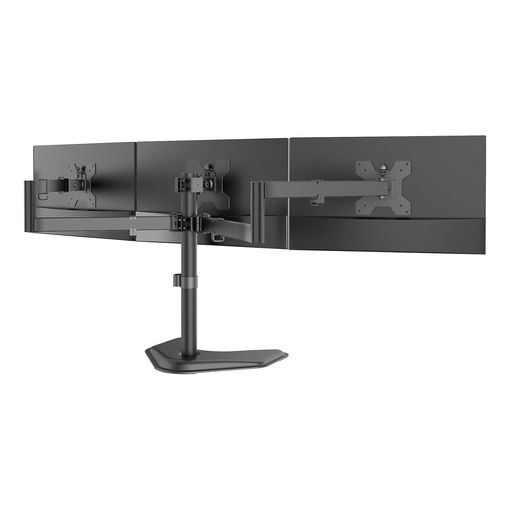
Running three monitors on three separate stands eats a huge amount of desk space, and lining them up level with each other by eye is nearly impossible. WALI's free-standing stand solves both problems with a single steel V-base carrying all three arms, each rated to hold 10kg (22lb) across screens up to 27 inches3. The base simply sits on the desktop instead of clamping to the edge or drilling through it. That means it works on desks a clamp can't grip, including glass or stone surfaces a screw shouldn't touch. Reviewers running three 27-inch panels report the centre screen tilts independently while the outer two swing to match, which is exactly what a trading or coding setup needs. None of its reviews we checked established weeks or months of ownership, so treat the 4.2-star average and nearly 3,800 ratings as an honest snapshot of first impressions rather than a confirmed long-term track record.
The Triple Arm: All The Details
Each arm mounts to VESA 75x75mm or 100x100mm plates and tilts, swivels, and rotates independently, with the centre arm tilting up to 15 degrees and the outer two up to 903. The 16-inch centre pole adjusts for height, and a cable channel runs along each arm to keep three sets of cables from turning into a tangle. Build leans on steel rather than the aluminium used in some pricier arms in this lineup, which is part of why it costs less than most other triple-monitor options. Several reviewers running three 27-inch panels side by side note the outer arms are too short to angle the screens as far inward as they'd like, and one described the whole assembly feeling less stable at that size. Stick to 24-inch panels or smaller, or accept the screens sitting mostly flat rather than curved inward, and that complaint stops applying to you.
PUTORSEN Monitor Arm Wall Mount Bracket, 17-42in
Best Wall-Mounted Monitor Arm
based on 417 Amazon reviews (4.5★), adjusted for performance, build and value
Skipping the Desk Entirely
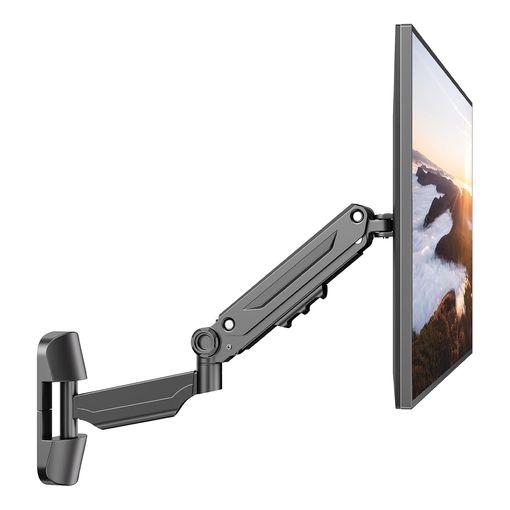
Every arm covered so far clamps to a desk or grommets through it, but not every desk has a clamp-friendly edge, and some setups need the surface completely clear. PUTORSEN's arm skips the desk: a wall plate carries a gas-spring arm rated for 12kg across 17 to 42-inch screens4, leaving the entire desktop free for anything else. One buyer used it to hold a 34-inch curved monitor without issue, and another mounted a 10kg television to swing between a seated and standing height at a workbench. Reviewers consistently describe the gas spring itself as smooth once correctly tensioned. We didn't find a review in its section establishing weeks or months of ownership, so the 4.5-star average is best read as an honest first-impressions snapshot; one buyer did flag a specific issue within the first day, a bit of play between the monitor bracket and the arm's sliding plate, fixed with cardboard shims.
What Wall-Mounting Actually Involves
Installation here is a genuinely different job from every other pick: you're drilling into a wall rather than clamping onto a desk edge, so finding a stud or solid masonry matters, not hollow plasterboard. PUTORSEN backs the arm with a 10-year warranty4 and VESA 75x75mm and 100x100mm compatibility. A detachable VESA plate lets one person handle the whole install, without holding the monitor and driving screws at the same time. Tilt runs -35 to +35 degrees, swivel a full 180 degrees each way, and rotation the full 3604. The tradeoff is permanence: once it's screwed into the wall, repositioning the setup means drilling new holes rather than sliding a clamp along a desk edge. For a glass desk, a desk too thin to clamp, or a surface that needs to stay completely clear, that's a fair trade.
Duronic Monitor Arm Stand DM453VX1, Quad PC Desk Mount
Best Quad Monitor Arm
based on 112 Amazon reviews (4.4★), adjusted for performance, build and value
What We Love About the Four-Screen Pick
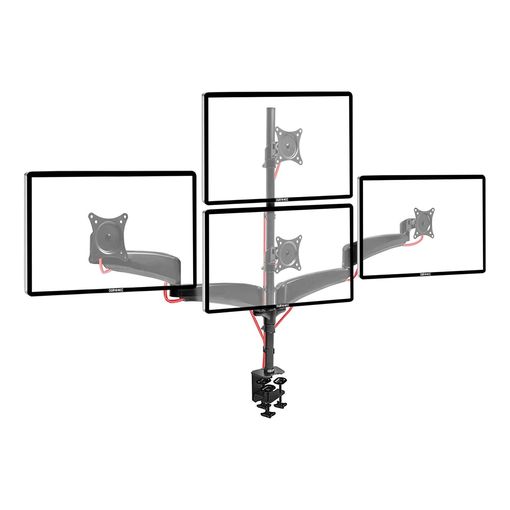
Once a setup grows past two monitors, most arms simply run out of room on a single clamp base. Duronic's DM453VX1 is built specifically for four. Two screens sit on extended, swivelling arms, and two more mount directly to the vertical pole, with each VESA bracket rated for 6kg, per the listing itself. One reviewer summed up the appeal directly: after nearly three years of use and two house moves, they wrote "I don't see me ever having to buy another arm ever again." That kind of longevity signal is exactly what a star average alone can't offer, and it counts for more given this pick carries a smaller review base than the higher-volume options in this roundup. A second reviewer reported running three 27-inch monitors on it comfortably, beyond what the four-screen spec sheet technically promises.
Four Screens, One Base: All The Details
The extended arms swivel through three separate joints each, letting those two screens move forward, back, and to the side, while the two pole-mounted screens rotate a full 360 degrees for portrait orientation. VESA 75x75mm and 100x100mm brackets cover the same monitors as everything else in this lineup, and Duronic backs the range with spare-parts availability for 10 years, useful given how many joints are doing work on a four-arm mount. Build is die-cast aluminium rather than the steel used in the WALI triple stand above, and it clamps to the desk edge out of the box, with a grommet base sold separately for anyone who'd rather drill a cable hole. It sits toward the premium end of this lineup, and the honest case against it is simple: buy it only if you genuinely need all four displays, not three.
Best Monitor Arm FAQ
What's the single most important spec when choosing a monitor arm? Weight capacity, checked against your monitor's actual weight rather than its screen size. A 27-inch monitor can weigh anywhere from around 3kg to well over 7kg depending on the panel and stand design, so two monitors with the same diagonal size can need very different arms. VESA mount compatibility is the other non-negotiable. Monitor arms attach using the Flat Display Mounting Interface standard maintained by VESA, the display industry's standards body5, most commonly a 75x75mm or 100x100mm hole pattern on the back of the panel. Without a matching pattern, the arm has nothing to attach to.
Will any monitor arm fit any monitor? Not automatically. Most monitors sold for home and office use carry a VESA 75x75mm or 100x100mm mounting pattern, which every arm in this roundup supports. Some all-in-one desktops, older monitors, and a handful of ultra-slim designs skip VESA mounting entirely or use a proprietary pattern, so it's worth checking the back of your specific monitor before buying rather than assuming compatibility.
Do I need a dual-monitor arm, or can I use two single arms? A dedicated dual arm like the HUANUO pick above shares one clamp base between two independently adjustable arms. That keeps both screens close together and easier to align at matching heights. Two separate single arms work too, and can sit further apart if your desk is wide. The tradeoff is that you're mounting and clamping twice, and aligning the heights by eye. For most people running two similarly sized monitors, a purpose-built dual arm is the simpler setup.
Is a triple or quad monitor arm better than buying separate single arms? Usually yes, if you actually need three or four screens running at once. A shared base keeps every screen at a consistent height without lining up separate stands by eye, and it's one clamp to fit instead of two, three, or four. The tradeoff is per-arm weight capacity: a multi-arm mount spreads its total rated load across more joints, so check the per-screen figure against your actual monitors' weight, not just the headline screen count, before assuming a triple or quad arm will hold what you already own.
Is a gas-spring arm worth paying more for than a basic mechanical one? For most buyers, yes. A gas-spring arm uses a sealed cylinder to counterbalance the monitor's weight, giving smoother, more precise movement that holds position reliably over years of daily adjustment. Basic mechanical-spring or friction-joint arms are cheaper but more prone to drifting or sagging, especially once the monitor's weight sits near the top of the arm's rated range, as the budget pick in this roundup illustrates.
Can a monitor arm damage my desk? A C-clamp mount grips the desk edge and is designed not to mark most solid desk surfaces. It's still worth checking the clamp's rated thickness range against your desk before buying, since very thin or very thick edges can be a poor fit. A grommet mount requires drilling a cable hole through the desk itself, which is permanent. Most arms in this roundup, including the budget and mid-range picks, include both mounting options so you can choose based on your own desk.
What do I need to wall-mount a monitor arm instead of clamping it to a desk? A solid fixing point matters more than anything else. A wall-mounted arm needs to anchor into a stud or solid masonry, not hollow plasterboard alone, since the wall fixing supports the full combined weight of the arm and monitor rather than sharing it with a desk surface. Beyond that, the appeal is a completely clear desk and independence from the desk's edge thickness or material, which matters for glass desks or any surface a clamp shouldn't grip.
How high should my monitor actually sit? General ergonomic guidance points to the top of the screen sitting at or near eye level, roughly an arm's length away, which is the same target used for laptop stands and any other screen-height setup67. A monitor arm makes hitting that target far easier than a fixed stand does, since you can adjust height, tilt, and distance independently rather than being locked into whatever position the stand shipped with.
Does a monitor arm work with a laptop, or only external monitors? A standard monitor arm needs a VESA-mounted screen, which rules out most laptops. Purpose-built products like the Suptek pick above solve this with a tray instead of a VESA bracket, letting you position a laptop the same way you'd position a monitor. If you're using a laptop as your only screen rather than alongside a monitor, a dedicated laptop stand is usually the simpler and cheaper way to get the same height boost.
The Best Monitor Arm for You
The Ergotron LX Premium Monitor Arm is the safest choice for most single-monitor desks, combining a genuinely smooth gas-spring lift with a weight range that covers nearly everything on the market. Choose the BONTEC if you want most of that same flexibility for considerably less, or the VIVO if your monitor is light enough that the budget tradeoffs won't matter day to day. Running two screens points you toward the HUANUO dual arm, and three or four screens call for the WALI triple stand or the Duronic quad arm respectively. A monitor over 34 inches or an unusually heavy panel calls for the Ergotron HX. A laptop sharing desk space with an external display is exactly what the Suptek tray was built for, and a desk that can't take a clamp at all is what the PUTORSEN wall mount solves. Match the pick to your monitor's actual weight and your desk setup, not just the price tag, and any of these nine will hold up for years.
-
Single Monitor Desk Mount, Holds Screens up to 32 inch Regular and 38 inch Ultrawide - VIVO ↩︎ ↩︎
-
Dual Monitor Arm - FlowLift Pro | Full Motion Desk Mount - HUANUO ↩︎ ↩︎
-
WALI Triple Monitor Stand, Free Standing for 13-27 inch Screens, MF003 - WALI Electric ↩︎ ↩︎
-
PUTORSEN Monitor Arm Wall Mount Bracket for 17-42 inch Screens - PUTORSEN ↩︎ ↩︎ ↩︎
-
Mounting Standard - Interface Standards for the Display Industry - VESA ↩︎
-
eTools: Computer Workstations - Workstation Components - Monitors - OSHA ↩︎