

Best USB Webcam for Streaming and Clear Video Calls

About the author...
Dave has been taking gadgets apart since he was old enough to be told not to. Every pick here is checked against the manufacturer's own documentation rather than the retail listing, and each star rating starts from a product's real Amazon customer score before being adjusted for performance, build quality, features and value. Read more about how ratings are calculated.
Table of contents
- Key Takeaways (TL;DR)
- How We Choose
- Quick Comparison
- Logitech Brio 4K Ultra HD Webcam
- Elgato Facecam MK.2 Full HD Streaming Webcam
- Razer Kiyo Pro Streaming Webcam
- Logitech C920S HD Pro Webcam
- Anker PowerConf C200 2K Webcam
- Insta360 Link 2 AI-Tracking PTZ Webcam
- Logitech C270 HD Webcam
- Spedal 4K Webcam with Tripod, Wide Angle 120 Degree
-
Best USB Webcam FAQ
- Should I prioritize resolution or frame rate?
- Why do some "4K" webcams look worse than 1080p ones?
- Does field of view matter, and is wider always better?
- Is autofocus better than fixed focus for a webcam?
- Will a webcam work through a USB hub, dock, or KVM switch?
- How much does low-light performance actually matter?
- How long should a USB webcam last?
- Do I need to buy a separate microphone too?
- The Best USB Webcam for You
The best USB webcam for most people is the Logitech Brio 4K, because it backs its resolution claim with a named 13-megapixel sensor and pairs it with Windows Hello facial login that almost nothing else in this list offers. Seven well-reviewed alternatives below cover tighter budgets, stronger low light, wider group framing, and hands-free tracking depending on what actually matters for your setup.
A webcam is judged on more than the number printed on the box. Two cameras can both say "4K" and produce very different pictures, because sensor size, lens quality, and how much the video gets compressed before it reaches your call all matter more than the pixel count alone. For most home offices and spare-room streaming setups, the lighting in the room does more to determine picture quality than the resolution figure does.
What separates a good webcam from a disappointing one usually shows up in three places. How it handles a dim room without a ring light. Whether it holds its top frame rate at the resolution you actually use, rather than only in a marketing spec. And whether it enumerates properly through whatever port, dock, or hub you're actually plugging it into. None of that is visible on the box. That's why we cross-checked every claim below against the manufacturer's own spec sheet rather than the Amazon bullet points. A webcam only handles video. If you're setting up for podcasting or streaming and want the audio side sorted too, our dynamic microphone roundup covers that as a separate purchase.
Key Takeaways (TL;DR)
- Low-light performance matters more than resolution for most home video calls; a clean 1080p feed beats a grainy "4K" one from a small sensor.
- Frame rate drops as resolution climbs on several of these cameras. Check the fps at the resolution you'll actually use, not just the headline number.
- Field of view and focus type change how you sit at your desk. A wide FOV shows more background; fixed focus skips autofocus hunting but can't chase you if you lean in.
- USB bandwidth can bottleneck an uncompressed feed through an older port, hub, or KVM switch, dropping frames or resolution without any error message.
- A named sensor is worth checking for, not just a resolution figure. Manufacturers that publish the sensor model are easier to verify than ones that don't.
- Expect several years of daily use before a USB port or hinge wears out. None of these run on a battery.
- A microphone is a separate purchase. Built-in webcam mics are fine for casual calls, weak for streaming or recorded audio.
How We Choose
Each webcam is judged on real image quality rather than the spec sheet headline: how it performs in ordinary room lighting, whether its frame rate holds up at the resolution you'd actually pick, and how the lens and field of view behave in practice. Build quality covers materials, mount, and any privacy shutter; value is judged against the other seven webcams here, not the wider market.
We don't run our own lab tests on these — no dedicated rig, no controlled conditions. What we do instead: read through the verified-purchase reviews in full, not just the star average, weighting the ones written weeks or months after purchase over launch-week first impressions, since that's where wear, reliability problems, and real-world performance gaps actually show up. Where a product genuinely lacks that kind of track record, we say so in its write-up rather than papering over it.
Quick Comparison
Each product's overall rating starts from its real Amazon customer rating, then gets adjusted (up to ±0.5) for real-world performance, build quality, features, and value. Click a product name to jump straight to its full review below.
| Product | Best For | Type | Key Detail | Key Spec |
|---|---|---|---|---|
|
Logitech Brio 4K Ultra HD Webcam 4.9 |
Most people wanting one webcam for everything | 4K webcam | 4K/30fps | 13MP sensor, Windows Hello IR |
|
Elgato Facecam MK.2 Full HD Streaming Webcam 4.5 |
Streamers who want manual DSLR-style control | 1080p streaming webcam | Uncompressed 1080p/60fps | Sony STARVIS sensor, fixed focus |
|
Razer Kiyo Pro Streaming Webcam 4.4 |
Dim rooms and rooms with changing light | Low-light webcam | Adaptive light sensor | Sony STARVIS sensor, 2.9um pixels |
|
Logitech C920S HD Pro Webcam 4.6 |
A dependable first webcam without overspending | 1080p webcam | 1080p/30fps | 5-element glass lens, autofocus |
|
Anker PowerConf C200 2K Webcam 4.6 |
Flexible framing on a mid-range budget | 2K webcam | 2K, 65-95 degree FOV | Adaptive light sensor, dual AI mics |
|
Insta360 Link 2 AI-Tracking PTZ Webcam 4.8 |
Moving around during calls or presentations | AI-tracking PTZ webcam | 2-axis AI tracking gimbal | 1/2-inch sensor, mechanical gimbal |
|
Logitech C270 HD Webcam 4.2 |
The cheapest reliable webcam for basic video calls | 720p webcam | 720p/30fps | Fluid Crystal auto light correction, 2-year warranty |
|
Spedal 4K Webcam with Tripod, Wide Angle 120 Degree 4.5 |
Wide-angle group calls with a physical remote and tripod | 4K wide-angle webcam | 4K/30fps, 120-degree FOV | Sony 1/2.8-inch sensor, 90.9dB HDR |
Logitech Brio 4K Ultra HD Webcam
Best Overall
based on 4980 Amazon reviews (4.5★), adjusted for performance, build and value
What We Love About the Best Overall Pick
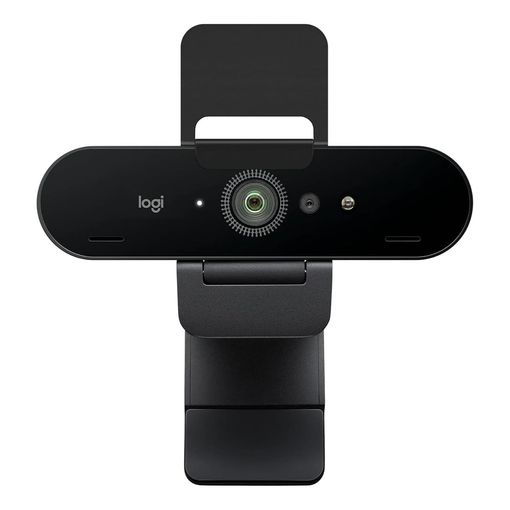
Most "4K webcams" don't disclose what's actually inside them. Logitech does: the Brio uses a 13-megapixel sensor that captures up to 4K at 30fps, steps down to 1080p at 60fps, and can push 720p to 90fps for smoother motion at lower resolution.1 That range covers video calls, screen-share heavy meetings, and casual streaming without swapping settings between them. RightLight 3, Logitech's automatic exposure correction, handles the lighting most home offices actually have. Low light, a bright window behind you, harsh overhead bulbs: it adjusts for all three.1 Its review pool is large at nearly 5,000 ratings, but none of the verified purchases visible on the listing actually state how long they'd owned it before writing, so treat the 4.5-star average as a strong snapshot rather than a confirmed long-haul track record.
The Best Overall Pick: All The Details
Three selectable diagonal fields of view (90°, 78°, 65°) let you frame tight on your face or wide enough to show a whiteboard behind you, and the autofocus glass lens holds focus reliably at desk distance.1 It's also the only webcam here with Windows Hello support, using paired optical and infrared sensors for facial login on compatible PCs.1 Logitech backs it with a three-year limited warranty. The catch is the cable: it ships with USB-A, so a USB-C-only laptop needs an adapter, and this is the priciest webcam in the lineup, which is the real cost of that feature list.
Elgato Facecam MK.2 Full HD Streaming Webcam
Best for Streaming Control
based on 1560 Amazon reviews (4.3★), adjusted for performance, build and value
Why Streamers Reach for This One
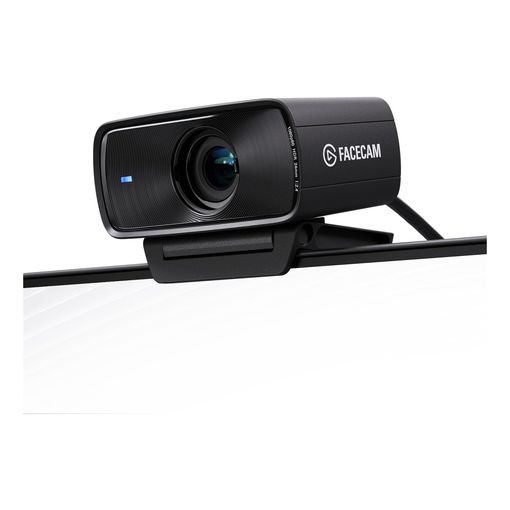
Elgato didn't chase a 4K number here, and that's deliberate. The Facecam MK.2 tops out at 1080p, but it delivers that resolution uncompressed at a full 60fps using a Sony STARVIS sensor, a chip built specifically for low-light sensitivity.2 The lens is fixed focus rather than autofocus, with a working range of roughly 30 to 120cm.2 For someone sitting still at a desk that's a feature: no hunting, no soft frames while the lens searches. It also means you can't casually lean toward the camera and expect it to keep up the way an autofocus model would. That reputation isn't spotless once the ownership window stretches out, either: one buyer who titled their review "six months of use" reported the Mac software as unreliable enough, laggy, poor in low light, that they wouldn't recommend the camera at all, a useful reminder that a strong star average can still sit on top of a rough post-purchase experience.
Facecam MK.2: What's Inside the Box
Camera Hub, Elgato's companion software, exposes DSLR-style manual controls including ISO and shutter speed rather than leaving everything to auto-exposure, plus multi-level noise reduction for dim rooms.2 An easy-slide privacy shutter is built into the body. Where it gives ground against the Brio above is resolution ceiling and price: you're paying a premium figure for a camera that stops at Full HD, and the tradeoff only pays off if uncompressed 60fps and manual control genuinely matter to you more than a 4K spec on the box.
Razer Kiyo Pro Streaming Webcam
Best for Low Light
based on 2500 Amazon reviews (4.2★), adjusted for performance, build and value
The Case for the Adaptive Light Sensor
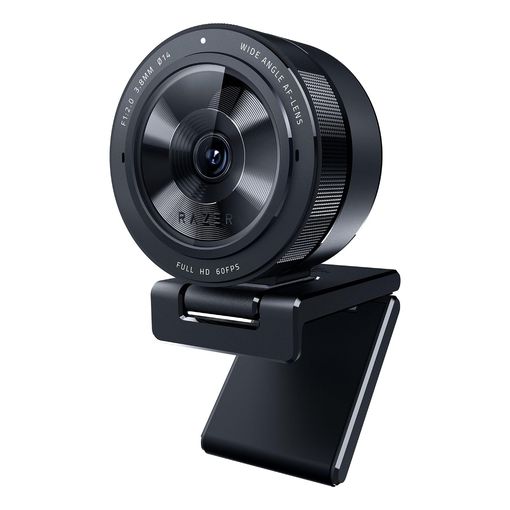
Razer built this one around a single problem: most webcams look terrible with the lights off or the curtains drawn. The Kiyo Pro uses a Sony STARVIS sensor with larger 2.9-micrometer pixels. Bigger pixels gather more light than the smaller ones packed into cheaper webcams.3 It also pairs that sensor with an adaptive light sensor, which continuously reads ambient brightness and adjusts exposure on its own instead of making you toggle a setting.3 It captures uncompressed 1080p at 60fps, though switching on HDR mode drops that to 30fps, a real tradeoff between smoothness and dynamic range rather than a free upgrade.3 None of its verified-purchase reviews visible on the listing state how long the reviewer had actually owned it, so the 4.2-star average is worth treating as an untested-over-time snapshot rather than a confirmed long-term signal.
Kiyo Pro: Where the Tradeoffs Sit
Three field-of-view presets, narrow, medium, and wide, are switchable in software, and the lens itself is marked as an autofocus design.3 It connects over USB 3.0 at up to 5 gigabits per second, which is what the uncompressed feed actually needs.3 That's worth flagging: plug it into an older USB 2.0 port, a budget hub, or some KVM switches and it can fail to hit its rated frame rate. There's no physical privacy shutter either, which the Brio and the Elgato both include, so anyone who wants that has to remember to unplug it or cover the lens by hand.
Logitech C920S HD Pro Webcam
Best Budget Pick
based on 10497 Amazon reviews (4.5★), adjusted for performance, build and value
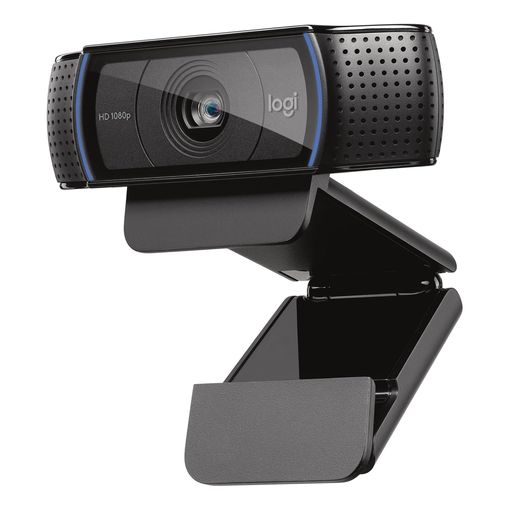
Why This Old Design Still Sells
Over ten thousand ratings on this listing is not a fluke. The C920S has been essentially the same camera for years. A five-element glass lens with genuine autofocus, a 78-degree field of view, and 1080p capture at 30fps.4 It doesn't do 60fps at any resolution and there's no adjustable field of view or HDR mode, so next to the newer webcams here it looks plain on a spec sheet. What it does reliably is get out of the way. Stereo mics, HD light correction, and a sliding physical privacy shutter cover the basics without any companion app required.4 One buyer who'd owned it for one to two years said it had "been great for meetings, online proctored tests" and even doubled as a monitoring feed for a 3D printer, exactly the kind of durability signal a spec sheet can't offer on its own.
C920S: The Honest Limits
This is a 1080p/30fps camera, full stop, and the low-light behavior is ordinary rather than notably good; it lacks the named sensor and adaptive exposure tech that the Kiyo Pro and Facecam MK.2 build around. For everyday video calls in a normally lit room, that ceiling rarely matters. It just means anyone chasing streaming-grade motion smoothness or genuinely low-light footage should look elsewhere on this list, because that isn't what this camera is trying to do.
Anker PowerConf C200 2K Webcam
Best Mid-Range Value
based on 9288 Amazon reviews (4.4★), adjusted for performance, build and value
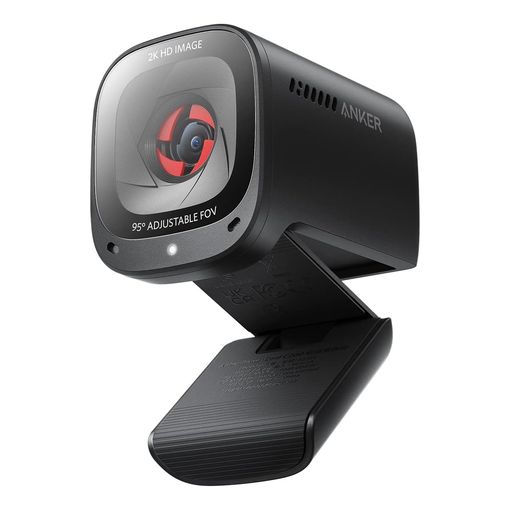
What Sets the Value Pick Apart
Nearly 9,300 ratings at 4.4 stars say this camera does its job without drama. The standout spec is field-of-view flexibility. You can pick 65°, 78°, or 95° through the AnkerWork software, the widest adjustable range of anything in this roundup.5 That's useful for switching between a tight solo call and a shared-screen recording with two people in frame. A larger aperture and an adaptive light sensor help it stay usable without a ring light. Dual mics with AI noise cancellation pick up your voice while suppressing keyboard and room noise.5 None of the verified purchases visible on its listing state an actual ownership timeframe, so there's no confirmed long-term signal here beyond the 4.4-star average itself.
PowerConf C200: What Anker Doesn't Say
Anker's own product listing doesn't state a frame rate or confirm autofocus anywhere in its published materials, which is a gap worth knowing about before you buy rather than after. Treat it as a fixed-focus 2K camera running at a standard frame rate rather than assuming a 60fps mode exists, because nothing we found confirms one. A built-in slide privacy cover and broad OS compatibility round it out. For the price tier it sits in, next to the C920S above and the more feature-rich cameras elsewhere on this page, it earns its place on value rather than outright capability.
Insta360 Link 2 AI-Tracking PTZ Webcam
Best for AI Tracking
based on 1600 Amazon reviews (4.6★), adjusted for performance, build and value
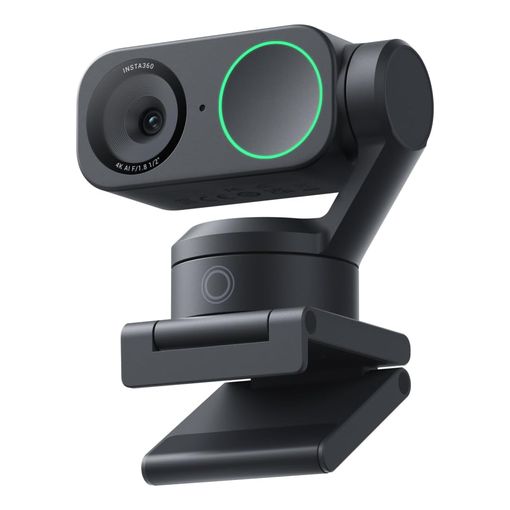
The Gimbal Changes How You Use a Webcam
Instead of digitally cropping and zooming into a wide sensor the way most "AI framing" webcams fake tracking, the Link 2 sits on a physical two-axis gimbal that pans and tilts to keep you centered as you move around a room.6 That's a genuinely different approach, and it's the reason this camera suits presenters, teachers walking to a whiteboard, or anyone who doesn't stay glued to one chair. Insta360 also publishes an unusually honest frame-rate breakdown. 4K only reaches 30, 25, or 24fps, while 1080p and 720p both go up to 60fps.6 The headline 4K figure comes with a real frame-rate cost attached, not a hidden one. One owner who'd had it six months summed up the calculation well, writing that it "was worth it if it lasts another couple years" — a fair way to think about a camera whose whole appeal rests on a moving gimbal.
Link 2: The Moving Parts Are the Tradeoff
The 1/2-inch sensor and a diagonal field of view of about 79.5 degrees put it in the same general class as the other well-specced cameras here, and low-light performance benefits from the sensor size plus onboard processing.6 What you're also buying is a mechanical gimbal, and mechanisms with moving parts have more that can eventually wear or fail than a fixed camera body does. If you sit still at a desk all day, that complexity buys you nothing. If you present, teach, or record from different spots in a room, it's the only webcam on this list built for that.
Logitech C270 HD Webcam
Best Ultra-Budget Pick
based on 25034 Amazon reviews (4.3★), adjusted for performance, build and value
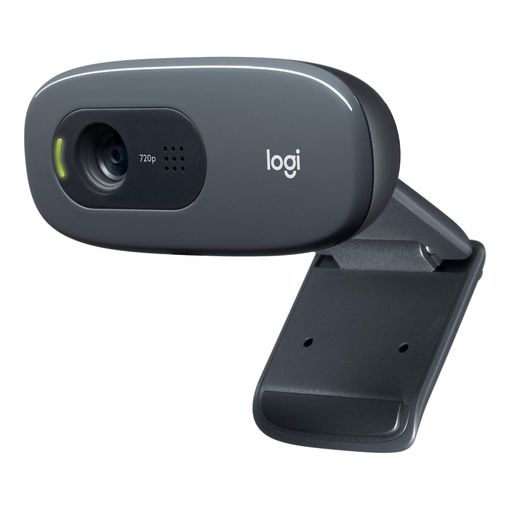
What We Love About the Ultra-Budget Pick
The C270 has been Logitech's entry-level webcam for over a decade, and the review volume behind it, more than 25,000 ratings at a 4.3-star average, says the formula still works. Fluid Crystal, Logitech's proprietary image-processing algorithm, automatically adjusts frame rate, sharpness, and colour to keep a 720p feed looking clean under ordinary room lighting, and a built-in noise-reducing mic means nothing else needs plugging in for a basic call. One buyer's long-term account is about as convincing a durability signal as this category gets: bought in 2018, it was "still works beautifully" eight years on, still drawing compliments on Teams calls despite being, in their words, only a basic webcam. Not every unit ages that gracefully, though. Another reviewer who'd bought two of these a year apart reported both developed a horizontal flickering fault after about a year of use, a real pattern worth knowing about rather than a one-off complaint.
The Ultra-Budget Pick: All The Details
This is a 720p/30fps camera and nothing more: no autofocus, no adjustable field of view, no privacy shutter, and no HDR mode.7 Logitech backs it with a 2-year limited hardware warranty and includes Fluid Crystal auto light correction as standard.7 It connects over plain USB-A with a 5-foot cable, and several reviewers note driver support on Windows 11 can be patchier than on Windows 10, worth checking before buying if that's the setup in question. For anyone who just needs to be visible and audible on a call without spending much, it remains the reliable floor of this category.
Spedal 4K Webcam with Tripod, Wide Angle 120 Degree
Best for Group Video Calls
based on 1075 Amazon reviews (4.3★), adjusted for performance, build and value
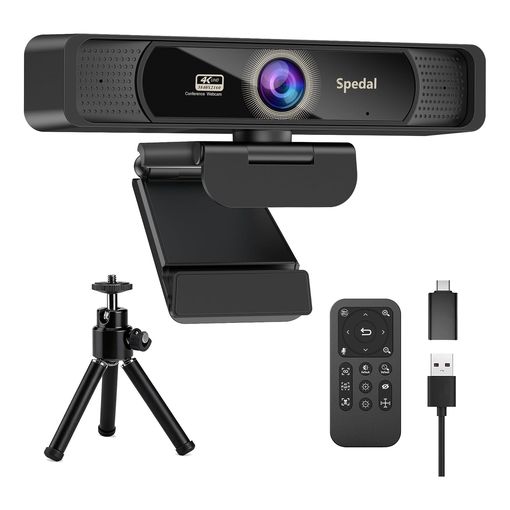
What We Love About the Wide-Angle Pick
Every other webcam in this lineup frames one person; the Spedal is built for two to five. Its 120-degree field of view is wide enough to fit a small huddle around a desk without the fisheye distortion that shows up on 180-degree lenses, and a genuinely named Sony 1/2.8-inch sensor backs up the 4K claim rather than just printing it on the box. The included remote handles 4x digital zoom, mute, image flip, and brightness from across the room, hardware-level controls that work the same regardless of which video app is running. Reviewers who use OBS or similar software praise the image quality directly, and one who said they'd owned webcams for over 25 years called this "the best I have ever experienced." None of its reviews we found reported back after real weeks or months of ownership, though, so treat that enthusiasm as a strong first impression rather than a settled long-term verdict.
The Wide-Angle Pick: All The Details
Spedal's own listing states the sensor needs a USB 3.0 port to hit full 4K resolution and frame rate; plugged into USB 2.0 or a passive hub, both drop. A 90.9dB hardware HDR mode balances a bright window against a dim room automatically, on top of the sensor's own low-light handling. A metal tripod with a 360-degree ball head ships in the box, sturdier than the plastic stands bundled with most webcams, though one reviewer found the mount itself "a little temperamental." Dual mics use AI noise reduction, though at least one detailed review found the microphone the weak point, well behind the camera's image quality. Hardware remote controls work without opening any companion software, a genuine convenience next to webcams that gate every adjustment behind an app.
Best USB Webcam FAQ
Should I prioritize resolution or frame rate?
For video calls, frame rate at your actual resolution matters more day-to-day than the headline number on the box. A webcam that holds 1080p at 30fps cleanly looks smoother and more natural than one that claims 4K but only reaches it at 24fps with visible motion judder. Check the frame rate at the specific resolution you plan to use, not just the highest number the listing leads with; several webcams here only hit their best resolution at a noticeably lower frame rate.16
Why do some "4K" webcams look worse than 1080p ones?
Resolution is only part of the picture. A tiny sensor squeezed into 4K pixel count captures less light per pixel than a larger sensor at 1080p, which shows up as noise and mush in anything but bright, even lighting. That's why manufacturers who name their actual sensor, like the Sony STARVIS sensors in the Kiyo Pro and Facecam MK.2, are easier to trust than listings that only quote a resolution figure with no hardware behind it.238
Does field of view matter, and is wider always better?
Field of view (FOV) decides how much of your room shows up in frame. A narrow FOV crops tighter around your face and hides background clutter; a wide FOV shows more of the desk and room, useful for demos or when two people share a shot. Wider isn't automatically better for a single-person call, since it can make you look smaller in frame and shows more of whatever's behind you. Webcams with an adjustable FOV, like the Brio and the PowerConf C200, let you pick per situation instead of committing to one.15
Is autofocus better than fixed focus for a webcam?
It depends on how still you sit. Autofocus refocuses automatically as you move closer to or further from the lens, which suits anyone who leans in, gestures, or doesn't sit at a fixed distance. Fixed-focus lenses, like the one on the Facecam MK.2, skip the risk of the lens visibly hunting and refocusing mid-call, but only stay sharp within a set distance range from the camera.2 Neither is objectively better; it's a question of whether you move around while you talk.
Will a webcam work through a USB hub, dock, or KVM switch?
Usually, but not guaranteed at full spec. Most modern webcams follow the USB Video Class (UVC) standard, maintained by the USB Implementers Forum and currently at version 1.5.9 That standard is what lets an operating system recognize a compliant camera and stream from it without installing a manufacturer driver. The catch is bandwidth: an uncompressed high-resolution, high-frame-rate feed needs more USB throughput than a compressed one, and older USB 2.0 ports, cheap hubs, and some KVM switches can't supply enough. The camera may still enumerate but drop to a lower resolution or frame rate, or fail to start at all. If your setup runs through a hub or KVM, plugging directly into a USB 3.0 port on the computer first is worth trying before assuming the webcam is faulty.
How much does low-light performance actually matter?
More than most buyers expect. Home offices and spare bedrooms are rarely lit for video, and a webcam with a small sensor and no low-light processing will look grainy or dark under ordinary ceiling lighting, regardless of its resolution. Features like Logitech's RightLight, Razer's adaptive light sensor, and Sony STARVIS sensors exist specifically because raw resolution doesn't fix this on its own.138 If you're choosing between a slightly higher resolution and confirmed low-light handling, the low-light feature usually matters more for how you'll actually look on a call.
How long should a USB webcam last?
Long enough that build quality rarely decides the purchase on its own. There's no battery to degrade, and the electronics inside a webcam don't wear out on a schedule. The parts that do fail over years of daily use are mechanical: a USB port working loose, a clip hinge wearing out, or, on the Insta360 Link 2, the gimbal motors that give it its tracking ability in the first place. A camera that's clipped and unclipped from a monitor daily will show wear there before the sensor itself degrades.
Do I need to buy a separate microphone too?
Almost always, yes, if audio quality matters to you. Every webcam here has some form of built-in microphone, and they're adequate for a quick call, but none are built for streaming or recorded podcasting the way a dedicated microphone is. If audio is part of the plan, our dynamic microphone roundup covers XLR versus USB options and the gain issues that catch out a lot of first-time buyers.
The Best USB Webcam for You
If you just want one camera that handles calls, casual streaming, and screen-heavy meetings without a second thought, the Logitech Brio 4K is the safest buy here, and Windows Hello is a genuine bonus if your PC supports it. Tight on budget or buying your first webcam at all, the Logitech C920S remains the dependable choice with the review history to back it up, while the Anker PowerConf C200 adds more flexible framing for a similar price. Spending as little as possible and only need to be seen clearly, the Logitech C270 is the reliable floor of this category. If your room lighting is bad, look at the Razer Kiyo Pro first. Streamers who want manual control should weigh the Elgato Facecam MK.2, anyone who moves around while presenting or teaching gets the most out of the Insta360 Link 2's tracking gimbal, and small groups sharing one desk should look at the Spedal's 120-degree field of view before anything else here.
-
Logitech BRIO Webcam with 4K Ultra HD Video & HDR, Logitech ↩︎ ↩︎ ↩︎ ↩︎ ↩︎ ↩︎ ↩︎
-
Razer Kiyo Pro, Webcam with Adaptive Light Sensor, Razer ↩︎ ↩︎ ↩︎ ↩︎ ↩︎ ↩︎ ↩︎
-
Logitech C920s PRO Full HD Webcam with Privacy Shutter, Logitech ↩︎ ↩︎
-
Logitech C270 HD Webcam, 720p Video with Noise Reducing Mic, Logitech ↩︎ ↩︎
-
Security Camera Image Sensor Technology STARVIS, Sony Semiconductor Solutions ↩︎ ↩︎