

Best Ergonomic Mouse for Wrist and Forearm Comfort

About the author...
Dave has been taking gadgets apart since he was old enough to be told not to. Every pick here is checked against the manufacturer's own documentation rather than the retail listing, and each star rating starts from a product's real Amazon customer score before being adjusted for performance, build quality, features and value. Read more about how ratings are calculated.
Table of contents
- Key Takeaways (TL;DR)
- How We Choose
- Quick Comparison
- Logitech MX Vertical Ergonomic Mouse
- Anker 2.4G Wireless Vertical Ergonomic Optical Mouse
- Logitech Lift Vertical Ergonomic Mouse
- Logitech Lift Left Vertical Ergonomic Mouse
- Evoluent VerticalMouse 4 Right
- Logitech MX Master 3S
- Logitech MX Ergo Wireless Trackball Mouse
- Logitech ERGO M575 Wireless Trackball Mouse
- Kensington Orbit Wireless Trackball with Scroll Ring
- Contour Unimouse Ergonomic Vertical Mouse
- Razer Basilisk V3
-
Best Ergonomic Mouse FAQ
- Will an ergonomic mouse actually cure RSI or carpal tunnel?
- What angle should I choose for a vertical mouse?
- Are trackballs slower than a regular mouse?
- Do I need special software to use these mice?
- Can left-handed people use a right-handed vertical mouse?
- How long should an ergonomic mouse last?
- Is a wired or wireless ergonomic mouse better?
- Do these mice work for gaming?
- What's the difference between DPI and how accurate a mouse feels?
- Do I need a mouse pad or mat with a vertical mouse or trackball?
- How does an ergonomic mouse fit into a wider ergonomic desk setup?
- Should I buy the most expensive option to get the best ergonomic benefit?
- The Best Ergonomic Mouse for You
The best ergonomic mouse right now is Logitech MX Vertical. Its 57° handshake angle changes wrist posture without a long learning curve, and it works across the widest range of desks and hand sizes. See the comparison below for how 10 other well-reviewed alternatives stack up.
An ergonomic mouse changes the angle your hand and forearm sit at while you work. It replaces the flat, palm-down grip of a standard mouse. That matters most for anyone clicking for hours at a stretch: writers, developers, designers, and anyone living in a spreadsheet. The category splits into a few real shapes, not just one design with different logos. Vertical mice tilt the hand toward something closer to a handshake. Trackballs remove arm movement entirely, since the cursor moves under your thumb or fingers instead of your whole hand sliding across a mat. A smaller group of adjustable designs let you set the angle yourself instead of accepting whatever the manufacturer picked.
What separates a genuinely good pick from a gimmick is mostly in the details a product photo can't show. Are the buttons placed where your fingers naturally land? Does the click mechanism hold up after a year of daily use? Is the angle steep enough to actually change your posture, not just your desk aesthetic? Price correlates loosely with build quality here, but not perfectly. Some of the cheapest options in this lineup have held up fine for years. At least one of the pricier picks has real complaints about creaking plastic.
Key Takeaways (TL;DR)
- Angle matters more than the marketing photo suggests. A shallow 20-30° tilt is easy to adjust to. A steep 55-70° angle does more for wrist posture, but it takes longer to get used to.
- Trackballs remove arm movement entirely. That helps repetitive strain, but expect a learning curve of a week or two.
- Button placement beats button count. A mouse with four well-placed buttons beats one with eight you'll never comfortably reach.
- Scroll wheels and click switches are the most common failure point. That holds true across this whole category, at every price tier, based on what owners report months and years later.
- Rechargeable batteries save money over time, but you're stuck when the charge runs out. AA or AAA models never leave you stranded, though they cost more in batteries eventually.
- No mouse fixes existing wrist or hand pain on its own. It's one factor alongside posture, breaks, and the rest of your desk setup, not a substitute for medical advice.
- Software customisation is only worth paying for if you'll use it. Several picks here ship extra buttons that most owners never programme.
How We Choose
Every product here is judged on four things: hand position and angle, button layout and software, tracking accuracy, and how the build has actually held up for real owners. Angle claims and DPI figures come from each manufacturer's own specification pages, not the Amazon bullet points. Those bullet points are often copied across a brand's whole mouse lineup regardless of which model is actually listed.
We don't run our own lab tests on these mice. There's no force gauge measuring click actuation and no panel of testers logging hours on each shape. What we do instead: read the verified-purchase reviews in full, not just the star average. We weight reviews written weeks or months after purchase over launch-week first impressions, since that's where scroll-wheel wear, button double-clicking, and coating damage actually show up. Where a product's review section genuinely lacks that kind of track record, we say so rather than papering over it.
Quick Comparison
Each product's overall rating starts from its real Amazon customer rating, then gets adjusted (up to ±0.5) for real-world performance, build quality, features, and value. Click a product name to jump straight to its full review below.
| Product | Best For | Type | Key Detail | Key Spec |
|---|---|---|---|---|
|
Logitech MX Vertical Ergonomic Mouse 4.6 |
Most people wanting one all-round vertical mouse | Vertical mouse | 57° vertical angle | 57° handshake angle, Logitech Flow |
|
Anker 2.4G Wireless Vertical Ergonomic Optical Mouse 4.4 |
Budget shoppers trying vertical for the first time | Vertical mouse | 800-1600 DPI | 800-1600 DPI, 5-button optical sensor |
|
Logitech Lift Vertical Ergonomic Mouse 4.7 |
Smaller hands wanting genuine vertical comfort | Vertical mouse | 57° angle, small/medium hands | 57° angle, SmartWheel, Logi Bolt |
|
Logitech Lift Left Vertical Ergonomic Mouse 4.2 |
Left-handed users who want a proper vertical fit | Vertical mouse (left-handed) | 57° angle, left-handed | Mirrored left-hand shape, Logi Bolt |
|
Evoluent VerticalMouse 4 Right 4.7 |
Severe wrist pain needing the steepest angle | Vertical mouse | 6 buttons, wired | 6 buttons, 4-speed DPI switch |
|
Logitech MX Master 3S 4.9 |
Buyers who don't want a vertical shape | Ergonomic mouse | 8,000 DPI sensor | 8,000 DPI sensor, MagSpeed scroll |
|
Logitech MX Ergo Wireless Trackball Mouse 4.8 |
Desk-bound multitaskers who prefer a trackball | Trackball | 20° adjustable tilt | 20° tilt, magnetic metal base |
|
Logitech ERGO M575 Wireless Trackball Mouse 4.7 |
Tight budgets who still want a trackball | Trackball | Thumb-operated trackball | Logi Bolt receiver, thumb-ball trackball |
|
Kensington Orbit Wireless Trackball with Scroll Ring 4.5 |
Switching hands or sharing one desk | Trackball | 40mm scroll-ring trackball | 128-bit AES encryption, 40mm ball |
|
Contour Unimouse Ergonomic Vertical Mouse 4.3 |
Anyone who wants to fine-tune every angle | Adjustable vertical mouse | 35°-70° adjustable tilt | 35°-70° friction hinge, rotating thumb rest |
|
Razer Basilisk V3 4.8 |
Gamers who still want ergonomic support | Gaming mouse | 26,000 DPI wired sensor | Focus+ 26K DPI sensor, HyperScroll wheel |
Logitech MX Vertical Ergonomic Mouse
Best Overall Ergonomic Mouse
based on 13940 Amazon reviews (4.4★), adjusted for performance, build and value
What We Love About the All-Round Pick
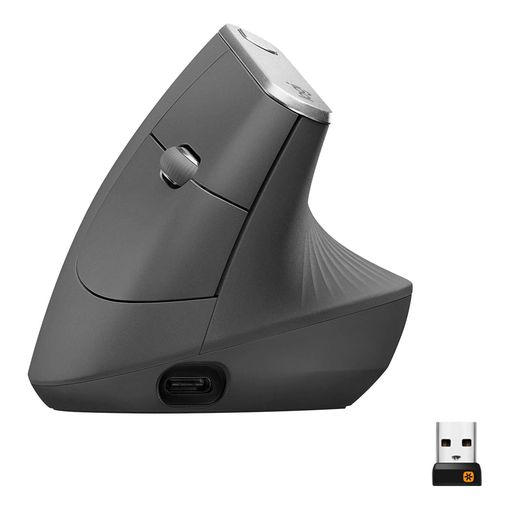
The MX Vertical's 57° angle sits at a genuine middle ground. It's steep enough to change how your wrist sits. It's shallow enough that most people adjust within a session or two, not a week. It connects to up to three devices and switches between them with Logitech's Flow software. That's genuinely useful if you split time between a work laptop and a personal desktop. Build quality is solid, though not flawless forever. One owner reporting back after just over two years said the left-click button had started double-releasing mid-drag. They'd found it was a known issue across several Logitech mice, and felt two years was short for the price. Most buttons are well placed. A couple of long-term reviewers do note the click surfaces are flat rather than curved, which feels less natural than Logitech's own smaller Lift.
The All-Round Pick: All The Details
The mouse ships with a rechargeable battery rated for around four months per charge. A one-minute quick-charge gives roughly three hours of use. It connects via Bluetooth, a USB-C cable, or Logitech's Unifying receiver. Logitech's own testing found the handshake position cuts muscular activity by 10% next to a standard flat mouse.1 It's built for medium to large hands. Several owners with smaller hands found it a stretch and suggest trying the Lift instead. Warranty support runs through Logitech's standard consumer terms. It works across Windows, macOS, and iPadOS via Bluetooth.
Anker 2.4G Wireless Vertical Ergonomic Optical Mouse
Best Budget Vertical Mouse
based on 52695 Amazon reviews (4.3★), adjusted for performance, build and value
What We Love About the Budget Pick
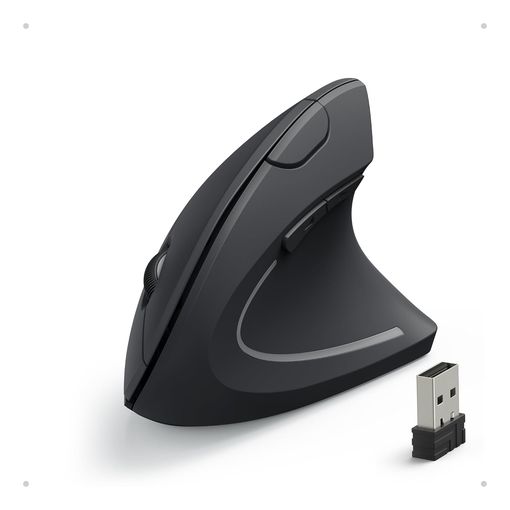
This is the mouse to try if you've never used a vertical shape. It lets you find out whether the design actually helps before spending more. It's one of the best-reviewed products in this entire lineup by volume, with tens of thousands of ratings backing a solid score. Setup is plug-and-play with no software required. One owner who'd used it as their main mouse for over a year said it had definitely helped with wrist pain. By that point, though, the scroll wheel had started feeling stiffer than when new. That pattern repeats across several long-term reviews. The mouse holds up well for around a year to fourteen months before the scroll mechanism starts to wear. At that point, some owners simply buy another rather than repair it, given how little it costs to replace.
The Budget Pick: All The Details
Three DPI settings (800, 1200, 1600) cover basic precision needs without any adjustment software. The mouse runs on two AAA batteries rather than a rechargeable cell. That means no charging cable to lose, but an ongoing battery cost. Five buttons cover the basics: left, right, scroll-click, and two side buttons for forward and back navigation. It's sold with an 18-month warranty through Anker's own support team. The plastic shell isn't premium, but it hasn't drawn the creaking or flex complaints that turn up on some pricier vertical mice.
Logitech Lift Vertical Ergonomic Mouse
Best Compact Vertical Mouse
based on 10063 Amazon reviews (4.5★), adjusted for performance, build and value
What We Love About the Small-Hands Pick
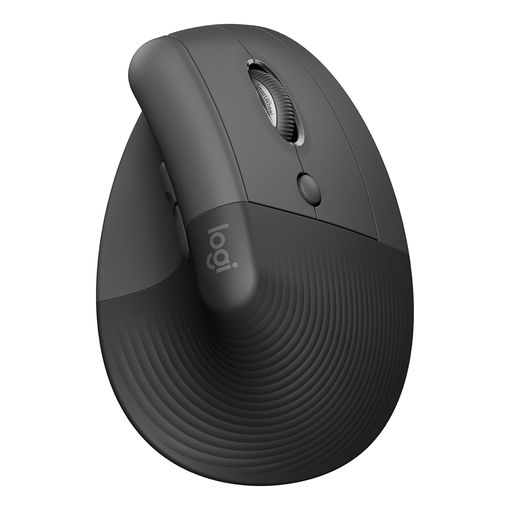
Logitech built the Lift specifically for smaller and medium hands, after hearing the larger MX Vertical didn't fit everyone. It shows: the shape tucks in rather than sprawling, and the click surfaces are curved instead of flat. Quiet clicks are a genuine upgrade if you work somewhere shared or sit on video calls often. One owner bought two, one for home and one for the office. After about two years of use, both were still going strong, though the right-click on one had recently started acting up. They suspected debris rather than a real fault. Not every review is glowing. At least one buyer found the palm section too narrow to properly support their hand, despite measuring as a correct fit on Logitech's own sizing guide. Trying before committing to a colour and size is worth it if you can.
The Small-Hands Pick: All The Details
The Lift shares the MX Vertical's 57° angle in a smaller footprint. Logitech's own ergonomics team describes that figure as the optimal hand angle for reducing strain.2 It runs on a rechargeable battery Logitech rates at up to two years between charges, via its SmartWheel and Logi Bolt USB receiver, plus Bluetooth for pairing without a dongle. Four of six buttons are customisable through Logi Options+. It connects to up to three devices with Logitech's Flow software for switching between them. A left-handed version exists as a genuinely separate product, reviewed next.
Logitech Lift Left Vertical Ergonomic Mouse
Best Left-Handed Vertical Mouse
based on 1071 Amazon reviews (4.2★), adjusted for performance, build and value
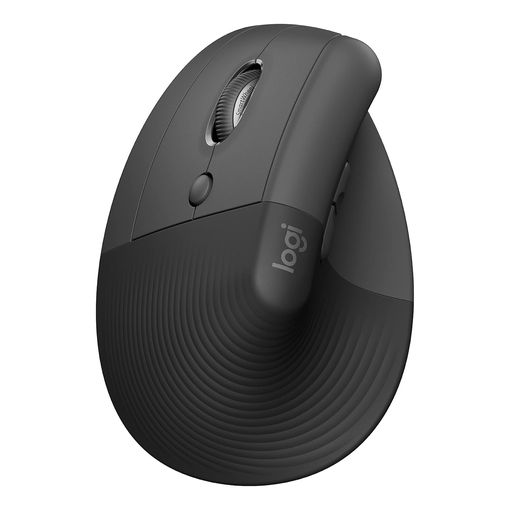
Why Left-Handed Buyers Get a Fair Deal Here
Left-handed users are usually an afterthought in this category. They're stuck with ambidextrous shapes that don't really fit either hand well. The Lift Left is a proper mirror of the standard Lift, not a reshaped compromise. Its thumb rest, scroll wheel, and buttons are all repositioned for a left hand, not just relabelled. Owners consistently describe an adjustment period of a few days, to get muscle memory used to button positions that don't match a standard mouse. Several say they wouldn't go back after that. Its rating sits a little lower than the right-handed Lift, with roughly a tenth of the review volume. That gap is common for left-handed variants across the whole industry, not a mark against this specific model. Its review section didn't turn up a purchase report that clearly established long-term ownership beyond general "still using it" comments, so we can't speak to multi-year durability the way we can for some other picks here.
Why Left-Handed Buyers Get a Fair Deal: All The Details
Specs mirror the standard Lift: the same 57° angle,2 the same rechargeable battery, and the same Logi Bolt/Bluetooth connectivity. Four buttons are customisable through Logi Options+, same as the standard Lift. One recurring complaint worth flagging first: several owners note that left and right click are swapped relative to a standard mouse by default. Fixing it through Windows' primary-button setting also flips a laptop's built-in trackpad buttons, since it's a system-wide setting rather than a per-device one. Logitech's own software can remap the buttons individually to avoid that conflict. It's a step several buyers didn't discover until after living with the inconvenience.
Evoluent VerticalMouse 4 Right
Best Vertical Mouse for Severe Wrist Pain
based on 2123 Amazon reviews (4.4★), adjusted for performance, build and value
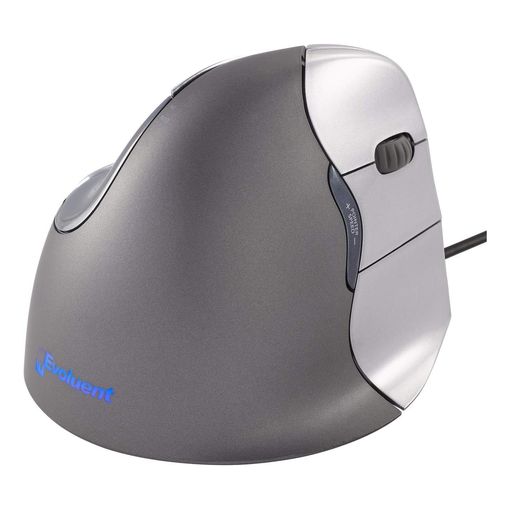
What We Love About the Steep-Angle Pick
Evoluent invented the vertical mouse category, and its angle is noticeably steeper than the mainstream Logitech options. It sits closer to a true handshake than a tilted flat mouse. That steepness is exactly why people with more established wrist or hand pain gravitate toward it. A peer-reviewed study funded by the U.S. National Institute for Occupational Safety and Health found the fully vertical designs it tested reduced forearm rotation the most. But those same designs also scored worst on raw pointing performance among the shapes tested, a genuine tradeoff rather than a pure upgrade.3 What sets this pick apart in the reviews is longevity. One owner bought a second unit only because a household needed a spare. Their original VerticalMouse was still going strong after more than ten years of daily use, and that pattern of decade-long units repeats often enough to be more than a fluke.
The Steep-Angle Pick: All The Details
It's wired rather than wireless. Some buyers see that as a downside; others prefer it, since there's no battery to charge and no wireless dropout to troubleshoot. Six programmable buttons cover left, right, forward, back, middle-click, and horizontal scroll. Four selectable pointer speeds are shown by an indicator light on the thumb rest.4 Software for remapping buttons is straightforward on Windows. Several Mac owners report the driver has historically been less stable. One described high CPU usage that resolved once the background process was closed. It comes in regular and small sizes, and in left and right-hand versions, a genuine rarity at this steep an angle.
Logitech MX Master 3S
Best Non-Vertical Ergonomic Mouse
based on 15060 Amazon reviews (4.6★), adjusted for performance, build and value
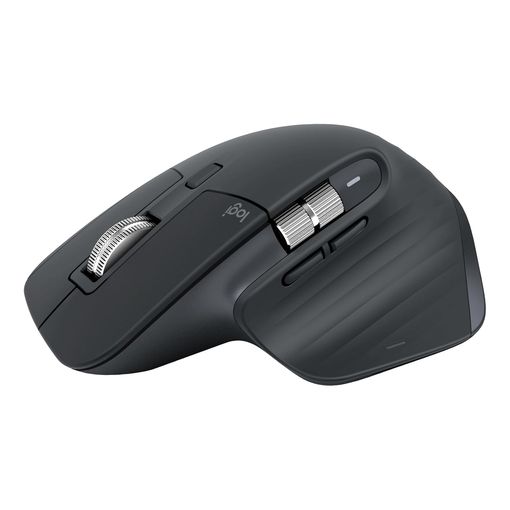
What We Love About the Non-Vertical Pick
Not everyone with hand or wrist discomfort wants a vertical shape. The MX Master 3S is the strongest case here for staying with a more conventional sculpted body instead. Its scroll wheel is genuinely one of the best in any mouse at any price, switching between a precise ratchet mode and a fast free-spin with a single click. The side thumb wheel handles horizontal scrolling well for spreadsheet-heavy work. It carries by far the highest raw customer rating and review volume of anything in this lineup. One long-term owner said they'd used it for over a year and called it the best mouse they'd ever owned. That sentiment shows up repeatedly among reviews written months after purchase, not just launch week. The one recurring long-term complaint is the rubber side grips. Several owners report the coating starts to feel sticky or begins peeling after a year or two of regular handling, which knocks down its durability score here despite the otherwise excellent build.
The Non-Vertical Pick: All The Details
An 8,000 DPI optical sensor tracks reliably even on glass surfaces, a step up from the sensors in most of the vertical mice in this lineup.5 It connects via Bluetooth or Logitech's encrypted Bolt receiver, and pairs with up to three devices through Flow. It charges over USB-C, with roughly two hours for a full charge. Quiet Clicks cut click noise substantially compared with the previous MX Master generation, which matters if you're often on calls near your desk. It isn't a vertical mouse, and it won't deliver the same wrist-angle change as the rest of this lineup. It's here for buyers who've decided vertical shapes aren't for them, but still want a genuinely ergonomic, well-supported sculpted mouse.
Logitech MX Ergo Wireless Trackball Mouse
Best Adjustable Trackball
based on 6004 Amazon reviews (4.5★), adjusted for performance, build and value
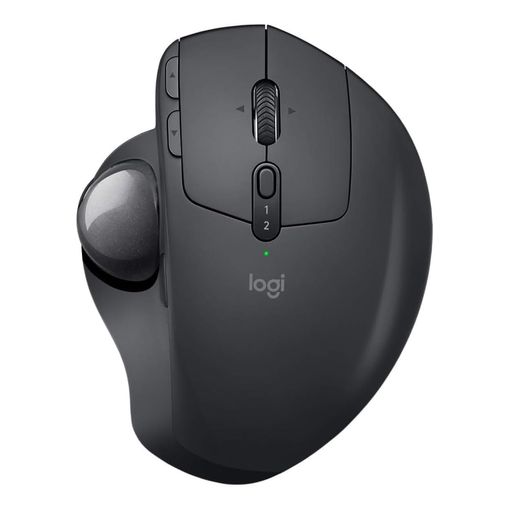
What We Love About the Trackball Pick
A vertical mouse changes the angle of your wrist. A trackball removes arm movement from the equation almost entirely, since your hand stays planted and only your thumb moves the cursor. The MX Ergo's magnetic metal base plate lets you flip between flat and a 20° tilt. The weight it adds makes the whole unit feel notably more substantial than cheaper trackballs. Reviewers who've kept one for years describe a fairly consistent pattern: comfortable and precise day to day. The main long-term risk is the right-click button starting to misfire, usually somewhere between 18 months and three years of heavy daily use. One owner tracked exactly that failure at around 20 months and had it replaced under Logitech's warranty without much hassle. A trackball does take longer to adjust to than a vertical mouse. Expect a genuine week or two of reduced precision before your thumb catches up.
The Trackball Pick: All The Details
Logitech's own ergonomics testing found the 20° tilt angle cuts forearm and wrist muscle strain by around a quarter compared with a flat trackball position.6 It connects via Bluetooth or a 2.4GHz Unifying receiver, and pairs with two devices through Easy-Switch. It charges over USB-C rather than taking a removable battery. Some long-time trackball owners who preferred swappable AAs see that as a step backward. Precision mode, activated by a dedicated button, temporarily slows cursor movement for detail work like retouching or CAD line-up. The trackball itself needs periodic cleaning, same as any exposed-ball design, though less often than older Logitech trackballs, according to several owners who'd used both.
Logitech ERGO M575 Wireless Trackball Mouse
Best Budget Trackball
based on 6728 Amazon reviews (4.6★), adjusted for performance, build and value
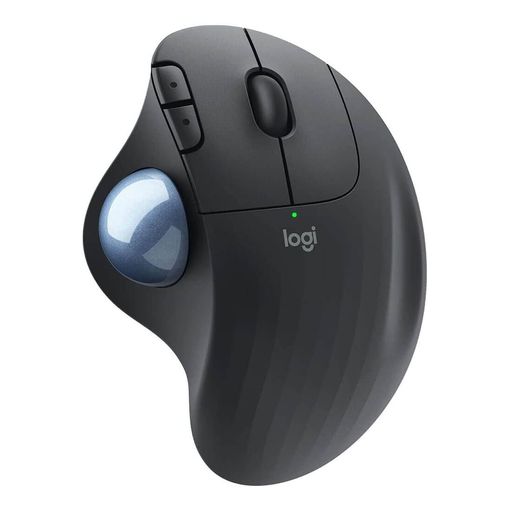
What We Love About the Budget Trackball
The M575 gives up the MX Ergo's adjustable tilt and metal base. It keeps the part that actually matters for most buyers: a comfortable, thumb-operated trackball shape at a genuinely accessible price. It has the highest raw star rating of any product in this whole lineup. One owner said they'd bought this exact model to replace a previous one that had lasted more than ten years. That speaks well of Logitech's trackball engineering, even at the cheaper end. A second long-term reviewer reported more than a year of daily 8-hour office use without a single issue. The one legitimately negative review we found involved a mismatched third-party listing, where the buyer received the wrong regional variant entirely. That's a seller mix-up rather than a fault with the product itself. It's still a good reminder to check you're ordering from a listing that ships the correct regional unit, not a grey-market import.
The Budget Trackball: All The Details
It connects through Logitech's secured Bolt receiver or Bluetooth. The ball sits flat under your thumb rather than tilted, so it lacks the MX Ergo's ergonomic angle adjustment. Cursor speed and button behaviour are configurable through Logi Options software, though it isn't required for basic use. It runs on a single AA battery Logitech rates at up to two years. Some owners see that as an advantage over rechargeable rivals, since a spare battery gets you back working instantly with no charging wait.
Kensington Orbit Wireless Trackball with Scroll Ring
Best Ambidextrous Trackball
based on 389 Amazon reviews (4.3★), adjusted for performance, build and value
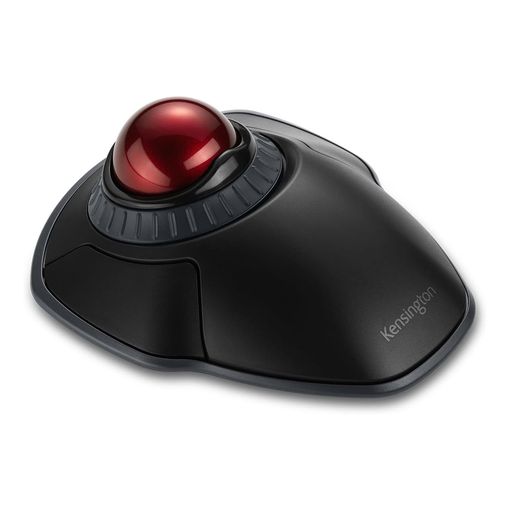
What Makes the Ambidextrous Pick Different
Unlike every other trackball here, the Orbit sits centred, with the ball controlled by your fingertips rather than your thumb from a hand-shaped side. That makes it genuinely usable by either hand without a mirrored version, and a sensible pick for a shared desk or anyone whose grip changes through the day. Several owners specifically cite conditions like osteoarthritis or recovery after carpal tunnel surgery as their reason for switching. They say the design puts noticeably less strain on the fingers than gripping a shaped mouse. Long-term reports skew positive but aren't spotless. One owner's previous wired Orbit lasted three years before failing, and Kensington replaced it on the strength of an emailed invoice with no fuss. Another flagged the right button becoming unreliable after a little under two years of use. It's a smaller-volume product than the Logitech trackballs here, so there's simply less review data behind any single pattern.
The Ambidextrous Pick: All The Details
The 40mm ball and surrounding scroll ring both track optically, with four selectable DPI settings. Dual 2.4GHz/Bluetooth wireless connectivity is secured with 128-bit AES encryption, a genuine step up in security posture for anyone using it on a managed work device.7 A detachable palm rest supports longer sessions. The scroll ring is a cleverer solution than a thumb-flicked wheel for scrolling long documents one-handed. It's pricier than the Logitech trackballs above, from a smaller company with a narrower support network. That's the main tradeoff against it.
Contour Unimouse Ergonomic Vertical Mouse
Best Fully Adjustable Ergonomic Mouse
based on 130 Amazon reviews (4.3★), adjusted for performance, build and value
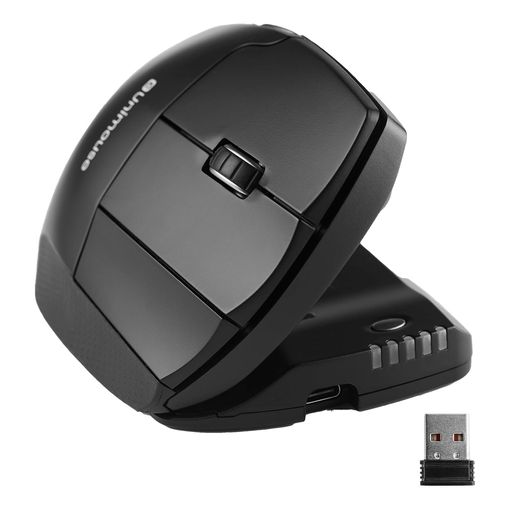
What We Love About the Adjustable Pick
No other mouse in this lineup lets you change the angle on the fly the way the Unimouse does. A friction hinge slides anywhere between 35° and 70°, so you can start shallow and work up to a steeper angle as your hand adjusts, or vary it through the day instead of committing to one fixed position. The thumb rest slides, pivots, and rotates independently. Several buyers with larger or unusually shaped hands say that finally gave them a proper custom fit, after other vertical mice felt one-size-fits-most. That flexibility is also its biggest weak spot. More than one reviewer described the plastic as feeling cheap for what it costs. One went as far as calling the build quality "unforgivable" at this price, after comparing it directly with a far less expensive rival. Its review section didn't surface a report establishing multi-year ownership, the way several other picks here did. We'd treat its long-term durability as genuinely unproven, rather than assume the worst or the best.
The Adjustable Pick: All The Details
The tilt range of 35° to 70° is unmatched by anything else in this roundup. Contour backs it with sizing guidance based on hand length for where to start.8 Six programmable buttons and a smooth scroll wheel round out the input options. The rechargeable battery is rated for around 12 weeks per charge, over a 2.4GHz USB receiver. It ships in left and right-hand versions, both fully adjustable rather than one being a compromise afterthought. If build quality worries you, the Evoluent above has a much longer track record at a similarly steep angle, just without the on-the-fly adjustability.
Razer Basilisk V3
Best Ergonomic Gaming Mouse
based on 9987 Amazon reviews (4.6★), adjusted for performance, build and value
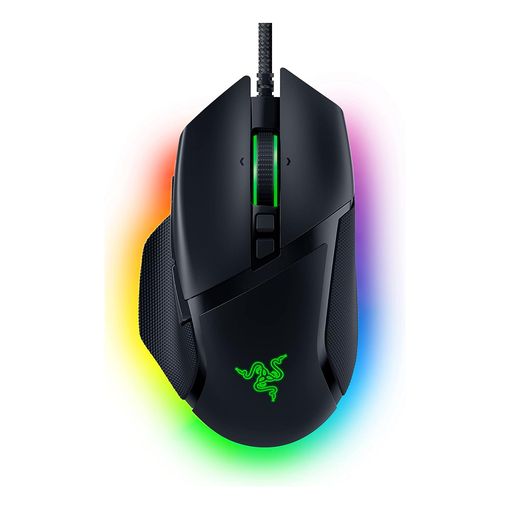
What We Love About the Gaming Pick
Gaming mice don't usually get called ergonomic. But the Basilisk V3's sculpted thumb rest and side grip are a genuine step up in hand support over a flat office mouse, without giving up the low-latency wired connection competitive games demand. The HyperScroll wheel switches between a notched, tactile mode and a silent free-spin with a physical click. That's as useful for flying through spreadsheets as it is for swapping weapons mid-match. It carries a strong rating backed by a healthy volume of reviews. Buyers with larger hands specifically call out how well it fills the palm compared with smaller-bodied rivals. Reports of extended ownership are thinner here than for some other picks. One buyer who'd had it a couple of months said it sat nicely in a large hand with no complaints. That's a real but modest signal, next to the multi-year reports elsewhere in this lineup.
The Gaming Pick: All The Details
Razer's Focus+ sensor tracks up to 26,000 DPI, with zero recorded spinout in Razer's own testing.9 The mouse ships wired, to avoid the latency and battery concerns of its wireless siblings. Eleven programmable buttons, including a side paddle, are configurable through Razer Synapse. Eleven-zone Chroma RGB lighting can be dimmed or switched off entirely, if you'd rather it blended into a plain desk setup. It isn't a vertical mouse and doesn't change your wrist angle the way most of this lineup does. If actual wrist-angle relief is the goal, rather than a mouse that just happens to feel comfortable, one of the vertical or trackball picks above will do more for you. Paired with a proper laptop stand and a monitor at eye height, though, it rounds out a genuinely ergonomic desk setup for anyone who also games.
Best Ergonomic Mouse FAQ
Will an ergonomic mouse actually cure RSI or carpal tunnel?
No single product cures either condition. No manufacturer here or elsewhere can honestly promise that. A peer-reviewed study on flat, angled, and vertical mouse designs found that increasing mouse height and angling the mouse body improved wrist posture without hurting pointing accuracy. That's a real, measurable benefit.3 But posture, how often you take breaks, your desk and chair setup, and any existing diagnosis all matter alongside the mouse itself. If pain is already established, see a doctor or occupational therapist rather than expecting a new mouse alone to resolve it. Workplace ergonomics guidance and regulations also vary by country, so check what applies where you are if your employer is involved.
What angle should I choose for a vertical mouse?
There's no single right answer. It depends on how much wrist rotation you're trying to eliminate, versus how much adjustment time you're willing to accept. A 57° angle, used by the Logitech MX Vertical and Lift, is a reasonable middle ground most people adapt to within a session or two.12 Evoluent's steeper angle and the Contour Unimouse's adjustable 35°-70° range go further for people managing more significant discomfort, at the cost of a longer adjustment period. The same research cited above found the steepest, fully vertical designs reduced wrist rotation the most. Those same designs also scored worst on raw pointing accuracy among the shapes tested, so steeper isn't automatically better for everyone.3
Are trackballs slower than a regular mouse?
Not once you're used to one, though the adjustment period is real. Expect reduced precision for a week or two while your thumb or fingers learn to control the ball, the way your whole arm used to control a mouse. After that, most long-term reviewers describe accuracy on par with a standard mouse. You also get the added benefit of needing far less desk space and zero arm movement.
Do I need special software to use these mice?
No. All of them work as a plug-and-play pointing device without installing anything. Software like Logitech's Options+, Kensington's driver, or Razer's Synapse unlocks button remapping, DPI presets, and app-specific profiles, but it's optional. If you know you won't bother configuring extra buttons, weight that toward the simpler, cheaper picks in this lineup instead.
Can left-handed people use a right-handed vertical mouse?
Some ambidextrous shapes, like the Kensington Orbit trackball here, work fine either-handed by design. Most vertical mice, though, are sculpted specifically for one hand. Using a right-handed vertical mouse left-handed defeats the ergonomic point of the shape entirely. If you're left-handed, look for a mirrored left-hand version, like the Logitech Lift Left above, rather than assuming a standard model will adapt.
How long should an ergonomic mouse last?
Based on what verified owners report months and years after purchase, a well-built mouse in this category should manage two to three years of daily use before any component starts to fail. Several owners in this lineup report a decade or more from Evoluent's wired design specifically. The most common failure point across nearly every brand and price tier is the scroll wheel or the left and right click switches, not the sensor or the shape itself. Rechargeable batteries also degrade over years of daily charging, same as a phone battery. A mouse that's otherwise fine may eventually need a shorter leash to its charging cable.
Is a wired or wireless ergonomic mouse better?
Wireless is more convenient day to day, and lets you sit further from your desktop tower. But it adds a battery or charging routine to think about. Wired removes any latency or dropout risk entirely, and never runs out of charge mid-task. That's why it's still the default for competitive gaming mice like the Razer Basilisk V3 here. Neither affects the actual ergonomic benefit of the shape. It's purely a convenience and reliability tradeoff.
Do these mice work for gaming?
The vertical and trackball designs above aren't built for gaming, and most owners don't use them that way, though nothing stops you. The Razer Basilisk V3 is the one product in this lineup purpose-built for gaming, while still offering genuine hand support through its sculpted shape. It's the pick to reach for if gaming performance matters alongside comfort.
What's the difference between DPI and how accurate a mouse feels?
DPI (dots per inch) measures how far the cursor moves per inch of physical movement. A higher number means more sensitivity, not necessarily more accuracy. A well-tuned 1,600 DPI sensor can feel more precise in practice than a poorly tuned 8,000 DPI one. For office and ergonomic use, DPI in the 800-1,600 range is plenty. The higher figures on gaming mice like the Basilisk V3 mostly matter for fast target acquisition, not everyday cursor control.
Do I need a mouse pad or mat with a vertical mouse or trackball?
A pad helps a vertical mouse glide consistently and protects a desk surface from wear, though it isn't strictly required for optical sensors on most modern desks. Trackballs don't need a pad at all. The ball itself does the tracking, rather than a sensor reading the surface beneath the mouse, which is one reason they suit tight desks so well.
How does an ergonomic mouse fit into a wider ergonomic desk setup?
A mouse alone addresses one part of a bigger picture. Wrist and forearm strain also comes from monitor height, chair support, and how far forward you lean to read a screen. Pairing an ergonomic mouse with a laptop stand or monitor arm, to get your screen to eye level, often does more for overall comfort than the mouse switch alone.
Should I buy the most expensive option to get the best ergonomic benefit?
Not necessarily. The angle and shape of the mouse drive most of the ergonomic benefit. Several of the more affordable picks here, including the Anker vertical mouse and the Logitech ERGO M575, use the same basic design principles as pricier alternatives. Extra spend generally buys better build quality, more software polish, and additional buttons, not a fundamentally different ergonomic effect.
The Best Ergonomic Mouse for You
If you want one mouse that works well for most people without much of a learning curve, the Logitech MX Vertical remains the safest all-round pick. Smaller hands and left-handed buyers are both genuinely well served here by the Logitech Lift and Lift Left, rather than being an afterthought. Anyone managing more serious wrist pain should look at the Evoluent's steeper angle or the Contour Unimouse's full adjustability. If a vertical shape isn't for you, the MX Master 3S and the two trackballs above prove the rest of this category has real, distinct answers, not one design wearing different badges.
-
Logitech MX Vertical Ergonomic Mouse official product page ↩︎ ↩︎
-
Logitech Lift Vertical Ergonomic Mouse official product page ↩︎ ↩︎ ↩︎
-
Evaluation of Flat, Angled, and Vertical Computer Mice and Their Effects on Wrist Posture, Pointing Performance, and Preference (NIOSH/CDC) ↩︎ ↩︎ ↩︎
-
Evoluent VerticalMouse 4 Right Hand Wired official specifications ↩︎
-
Logitech MX Ergo Advanced Wireless Trackball Mouse official product page ↩︎
-
Kensington Orbit Wireless Trackball with Scroll Ring official product page ↩︎